AI SEO Pilot
AI SEO Pilot is a WordPress plugin built for AI Engine Optimization (AEO) — also called Generative Engine Optimization (GEO). While traditional SEO targets the ten blue links on Google, AEO targets the way large language models retrieve, cite and summarize your content inside ChatGPT, Perplexity, Claude, Gemini and the new generation of AI search experiences.
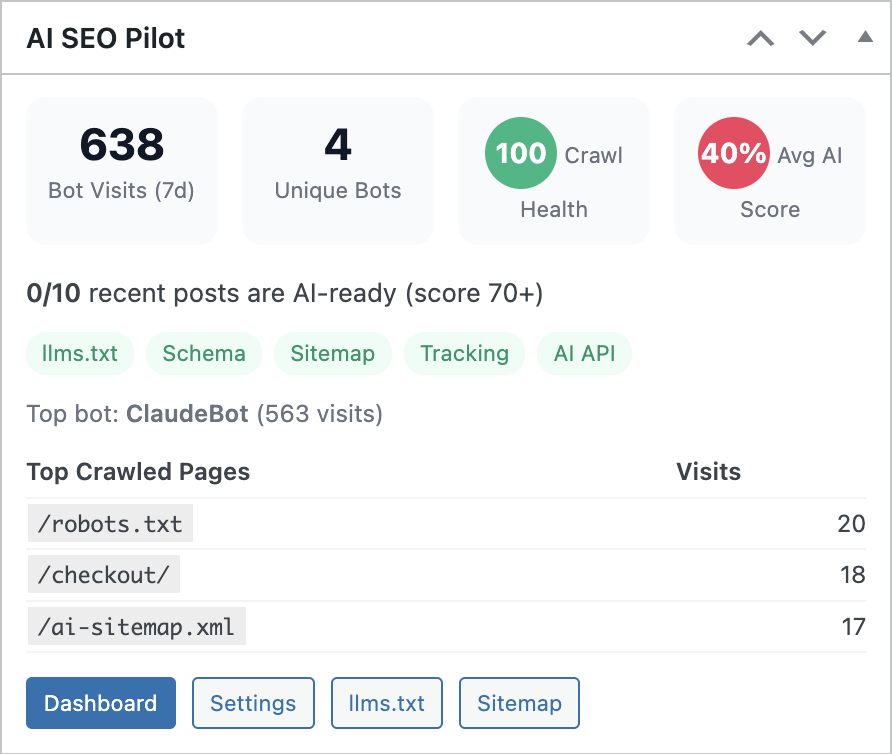
The plugin ships everything needed to make a WordPress site machine-readable and citation-worthy: an llms.txt generator, Schema.org JSON-LD output, content quality scoring on a 0–100 scale, focus keyword tracking, AI-optimized sitemaps and a real-time analytics panel that monitors GPTBot, ClaudeBot, PerplexityBot, GoogleOther and any custom crawler you decide to track.
Highlights
- llms.txt generation — auto-generated or hand-edited machine-readable file that tells AI crawlers what your site is about and which content to prioritize.
- Schema.org JSON-LD — Organization, Breadcrumb and WebSite markup with
sameAssocial profile links so AI systems can resolve your brand entity. - Content quality scoring — every post and page is scored on a 0–100 scale across ten configurable checks tuned for AI retrieval.
- AI bot tracking & analytics — a 30-day dashboard that monitors GPTBot, ClaudeBot, PerplexityBot, GoogleOther and custom bots with daily averages and crawl-health scores.
- Focus keyword management — track target keywords across the library, detect cannibalization between competing posts and receive resolution suggestions.
- Multi-provider AI — pluggable backend that supports OpenAI, Anthropic, Google Gemini, DeepSeek and Ollama (self-hosted).
- AI-optimized sitemaps — purpose-built XML sitemaps that surface the pages worth crawling to LLM agents.
- Multilingual UI — English, Italian, Spanish, German and French translations bundled with the plugin.
Requirements
| Requirement | Minimum |
|---|---|
| WordPress | 6.0 or higher |
| PHP | 7.4 or higher |
| MySQL / MariaDB | 5.6+ / 10.1+ |
| HTTPS | Recommended for AI crawler trust signals |
| AI provider | At least one API key (OpenAI, Anthropic, Gemini, DeepSeek) or a local Ollama endpoint for content analysis features |
The license key is required to activate analysis, optimization and tracking features. Structural output (llms.txt, JSON-LD, sitemaps) can be configured without an AI provider, but the content scoring and rewriting suggestions depend on an LLM backend.
Installation
- Download the AI SEO Pilot ZIP from your Slotix account.
- In WordPress, go to Plugins → Add New → Upload Plugin.
- Select the ZIP file and click Install Now.
- Click Activate Plugin once the upload completes.
- A new top-level menu, AI SEO Pilot, appears in the admin sidebar.
- Open AI SEO Pilot → Settings → General and paste your license key.
- Enable the modules you want to use: Schema.org markup, Content Analyzer, AI Visibility tracking and AI Sitemap generation.
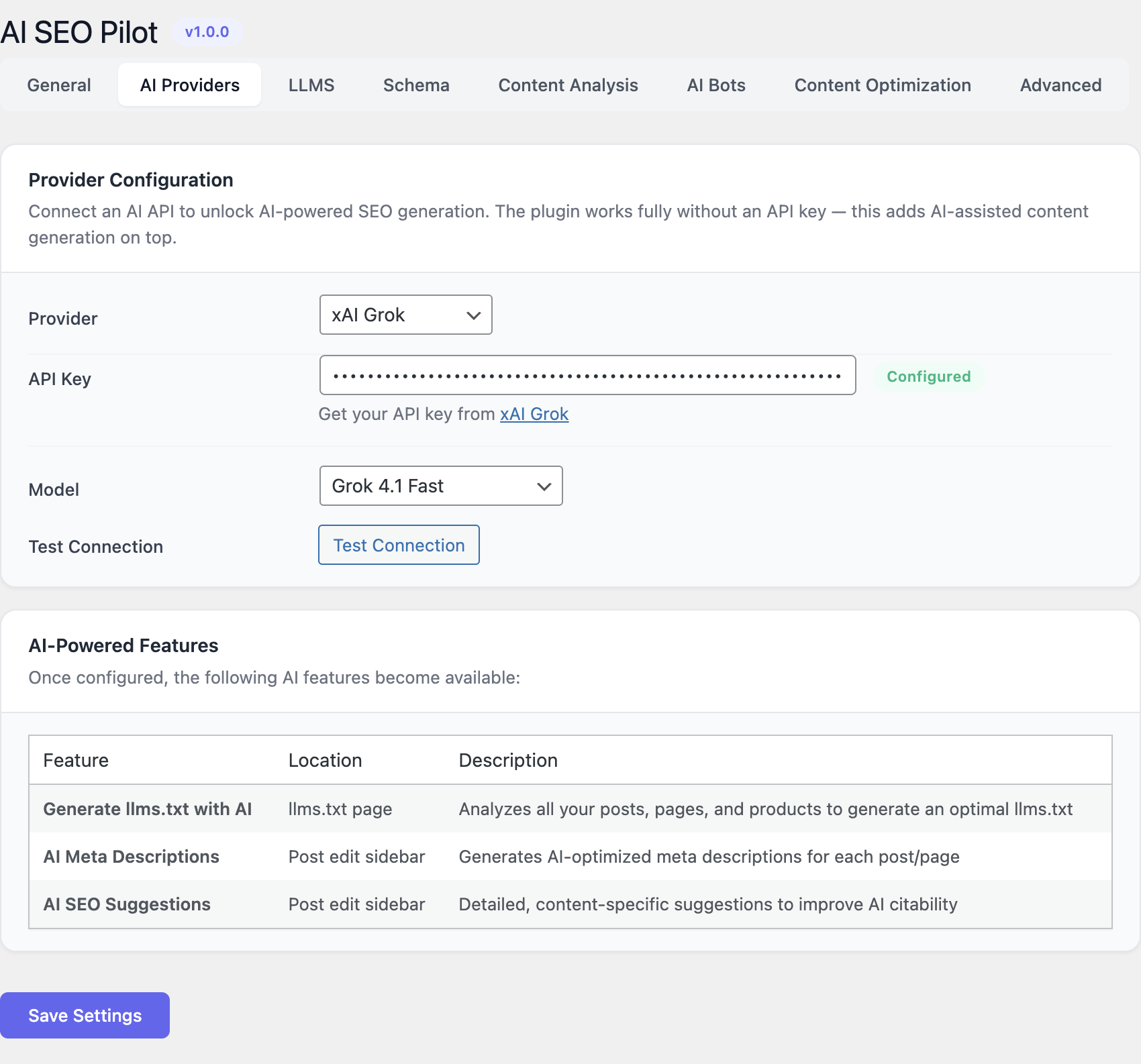
- Switch to the AI Providers tab, choose a provider, paste the API key, select a model and click Test Connection.
After the first save the plugin writes a virtual /llms.txt endpoint and the XML sitemap, both reachable from the front end without any web-server configuration.
Configuration
All configuration is exposed under AI SEO Pilot → Settings, organized in six tabs.
General
The General tab holds the master switches. Activating the license unlocks the analysis and tracking modules; each feature can be toggled independently so you can roll the plugin out gradually on an existing site.
- License key — validates the install and enables online features.
- Schema.org markup — turns JSON-LD injection on or off site-wide.
- Content Analyzer — enables the per-post scoring meta box.
- AI Visibility tracking — starts logging AI bot hits.
- AI Sitemap generation — exposes the AI-optimized sitemap.
AI Providers
Choose the LLM backend used by the Content Analyzer and the rewriting assistant.
| Provider | Notes |
|---|---|
| OpenAI | GPT-4o, GPT-4o-mini, GPT-4-Turbo and reasoning models. |
| Anthropic | Claude family — recommended for long-form rewriting. |
| Google Gemini | Suitable when you already use Google Cloud. |
| DeepSeek | Cost-optimized option with strong reasoning. |
| Ollama | Local, self-hosted models for full data sovereignty. |
Each provider requires its own API key (or local endpoint URL for Ollama). The Test Connection button validates the credentials and lists the models available on the account.
Content Analysis
The Content Analysis tab is where you tune what “AI-ready” means for your site.
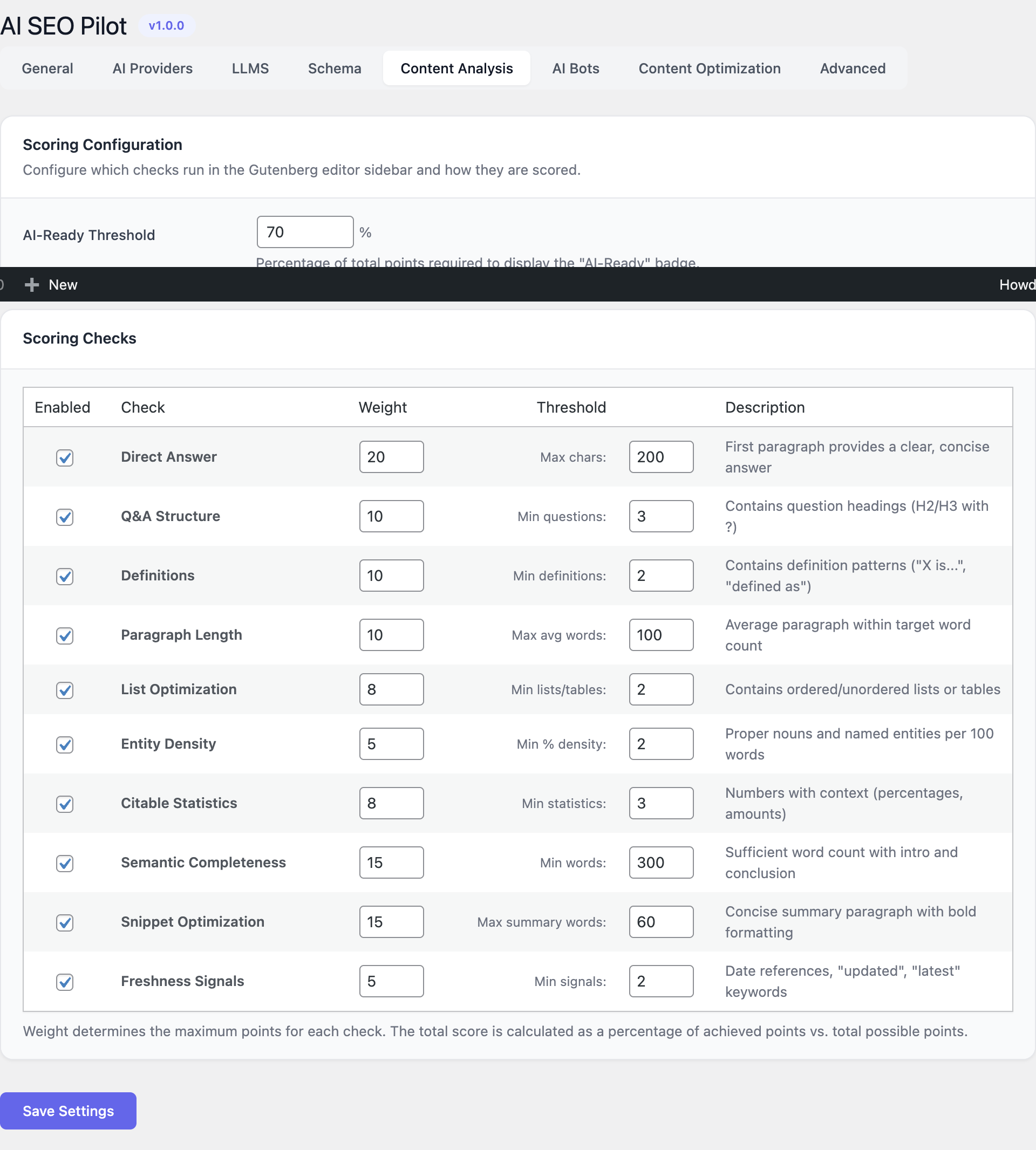
- AI-Ready Threshold — minimum overall score (0–100%) at which a post is considered ready for AI consumption. Posts below the threshold are flagged in the dashboard.
- Ten configurable checks — each check has its own enable toggle, weight (0–20) and threshold:
- Direct Answers — does the post contain succinct answers in the first paragraphs?
- Q&A Structure — explicit question/answer pairs that AI engines love to quote.
- Definitions — clear single-sentence definitions for key entities.
- Paragraph Length — short, scannable paragraphs.
- Lists — presence of bulleted or numbered lists.
- Entity Density — named entities per 100 words.
- Citable Statistics — quantitative facts with a source.
- Semantic Completeness — coverage of subtopics expected for the focus keyword.
- Snippet Optimization — formatting that maps to featured-snippet patterns.
- Freshness Signals — recency markers and updated timestamps.
- Default tone — Authoritative, Conversational, Technical or Simplified. The tone steers the AI rewrite suggestions.
llms.txt
Two modes are supported.
- Auto-generate — the plugin assembles
llms.txtfrom site metadata, top-level pages, key taxonomies and your most-cited posts. It is rebuilt every time content changes. - Manual — a single textarea where you paste a hand-written file. Useful when you need full editorial control or when you syndicate content from another platform.
The endpoint is served at https://<your-site>/llms.txt regardless of permalink structure.
Schema Markup
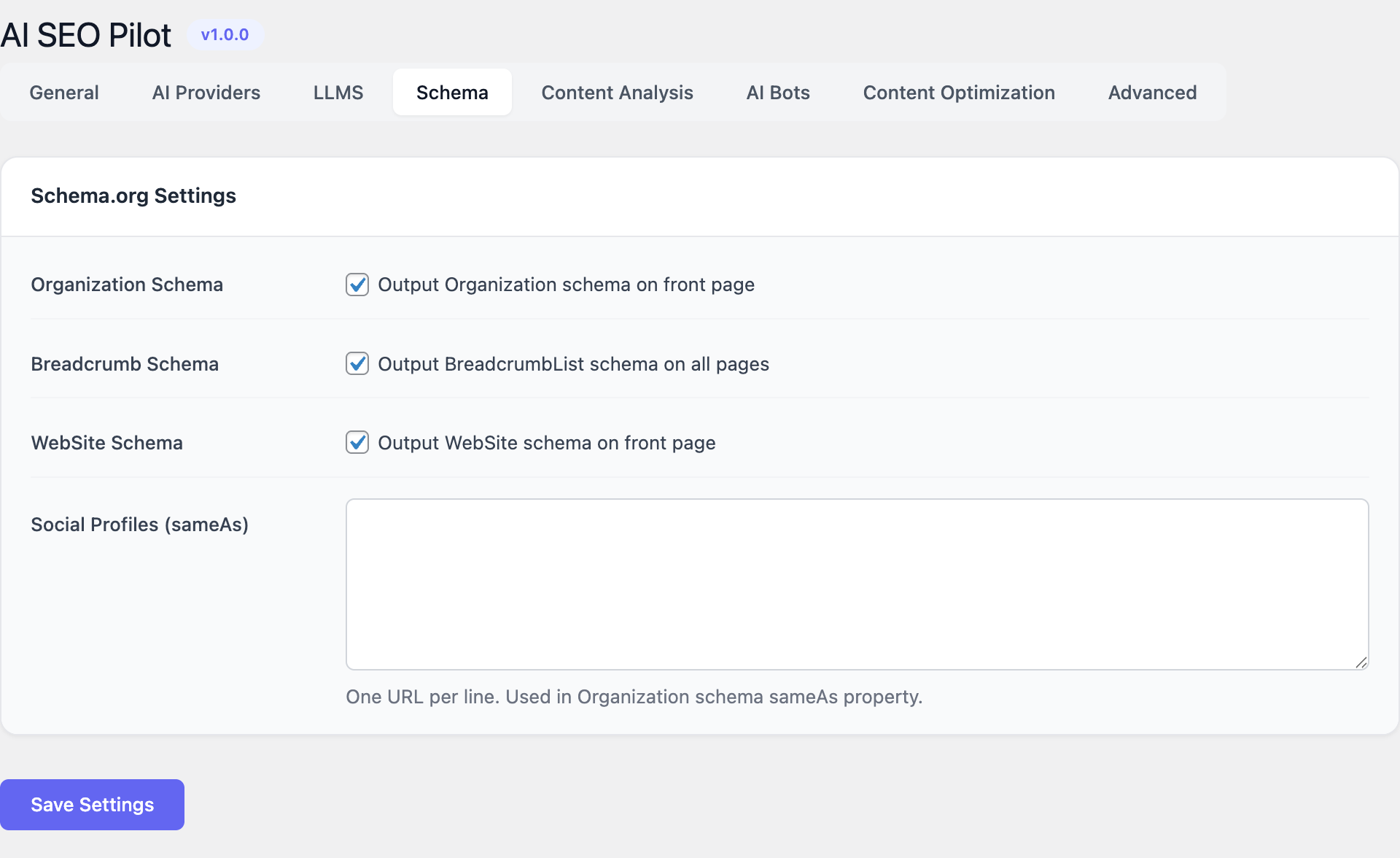
Enable individually:
- Organization — logo, legal name, contact point and
sameAssocial profile URLs (Twitter/X, LinkedIn, YouTube, GitHub, Facebook, Instagram, Mastodon, etc.). - Breadcrumb — automatic
BreadcrumbListderived from the site hierarchy. - WebSite — root
WebSiteentity withSearchActionfor sitelinks search.
All JSON-LD is injected in the page <head> and validates against Google’s Rich Results Test and Schema.org’s official validator.
AI Bots Tracking
- Retention — keep raw hits for 7 to 365 days. Aggregated daily totals are kept indefinitely.
- Built-in bots — GPTBot, ChatGPT-User, ClaudeBot, anthropic-ai, PerplexityBot, Perplexity-User, Google-Extended, GoogleOther, Applebot-Extended, Bytespider, CCBot, OAI-SearchBot and more.
- Custom bots — add any User-Agent fragment, give it a display name and group it under a service (for example “Internal QA crawler”).
Usage
Once the plugin is configured, day-to-day usage revolves around three surfaces: the Dashboard, the Content Quality screen and the post editor meta box.
Dashboard
The Dashboard is the landing page at AI SEO Pilot → Dashboard. It summarizes the site’s overall AI readiness, the latest AI bot activity and the posts that fall under the AI-Ready Threshold.
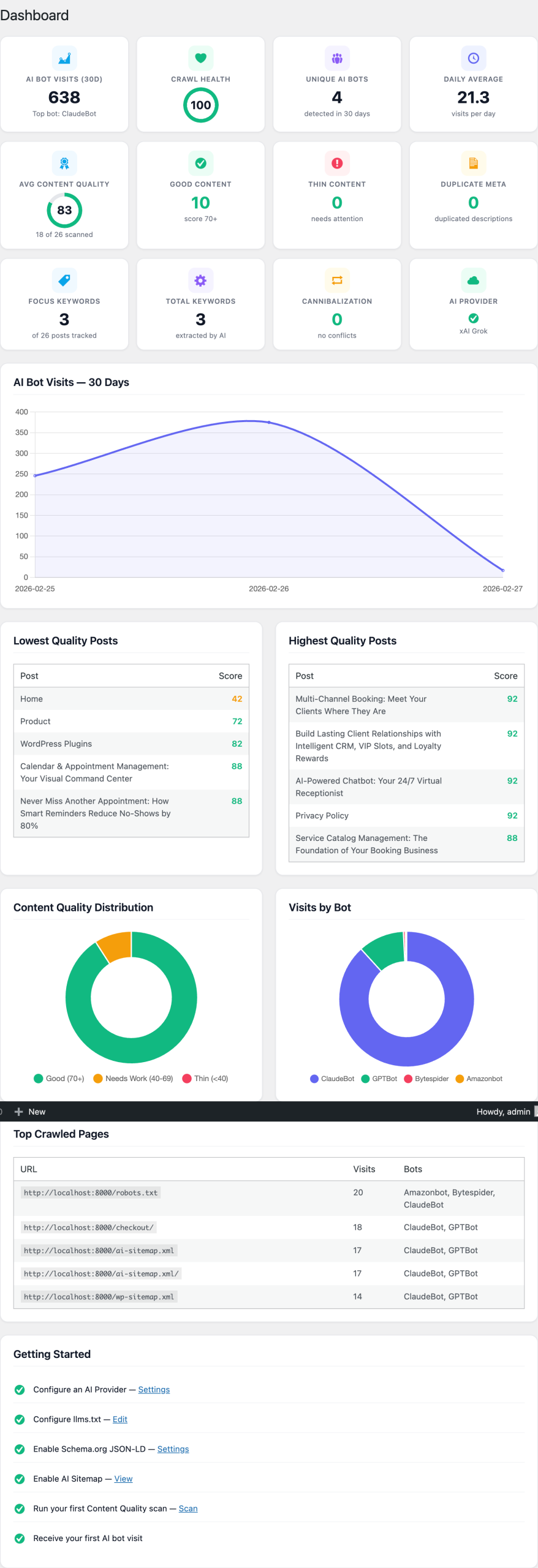
Use it for the weekly review:
- spot drops in average content quality;
- check that GPTBot, ClaudeBot and PerplexityBot are still crawling at expected rates;
- jump straight into the queue of posts that need improvement.
Content Quality
The Content Quality screen runs a batch scan over every post and page and lists results sorted by score.
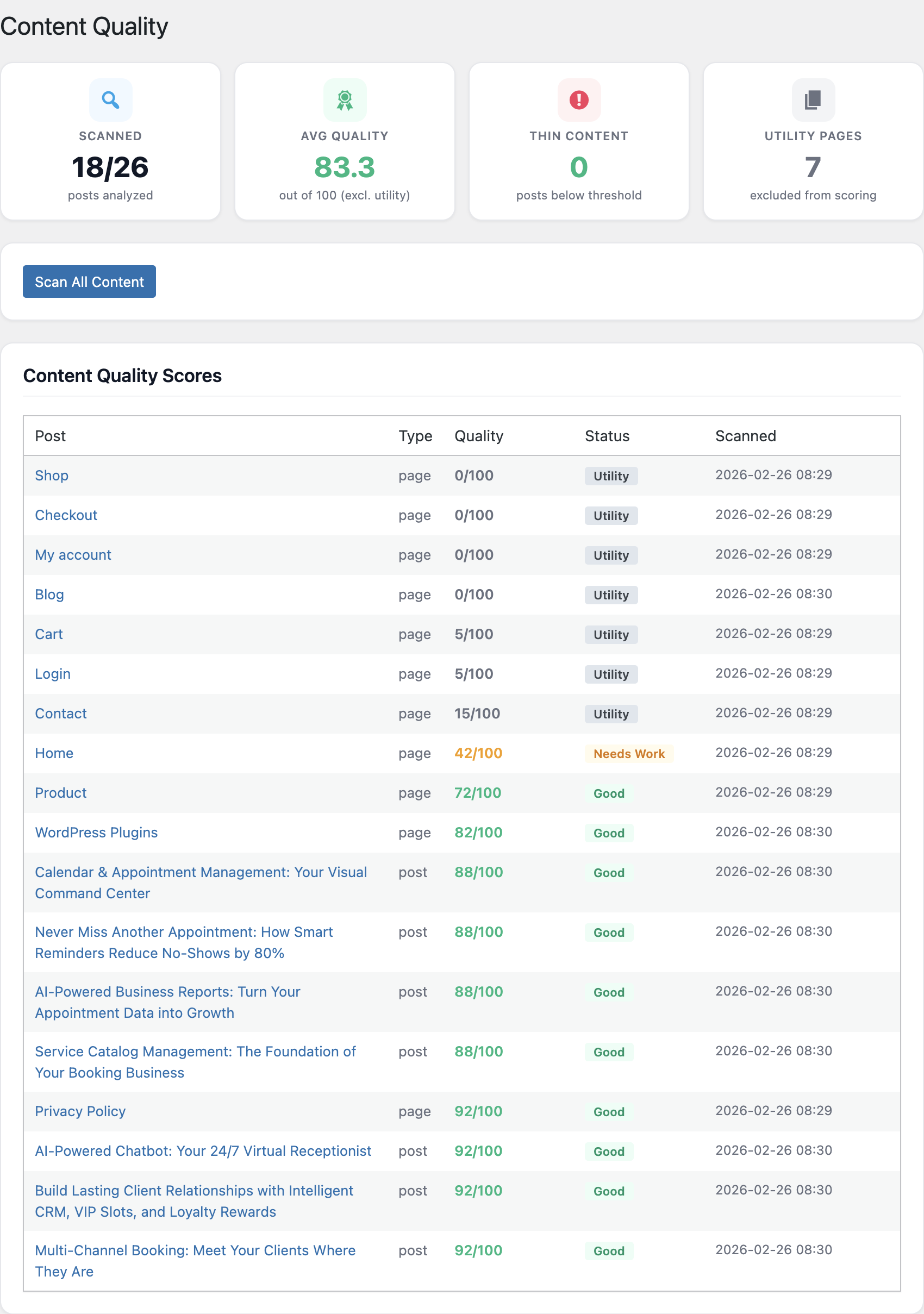
From this list you can:
- filter by post type, status, threshold or failing check;
- bulk-run the analyzer on selected items;
- click into any row to see the per-check breakdown and the AI-generated rewrite suggestions.
SEO Check meta box
Every post and page gains a sidebar meta box in the block editor titled AI SEO Check.
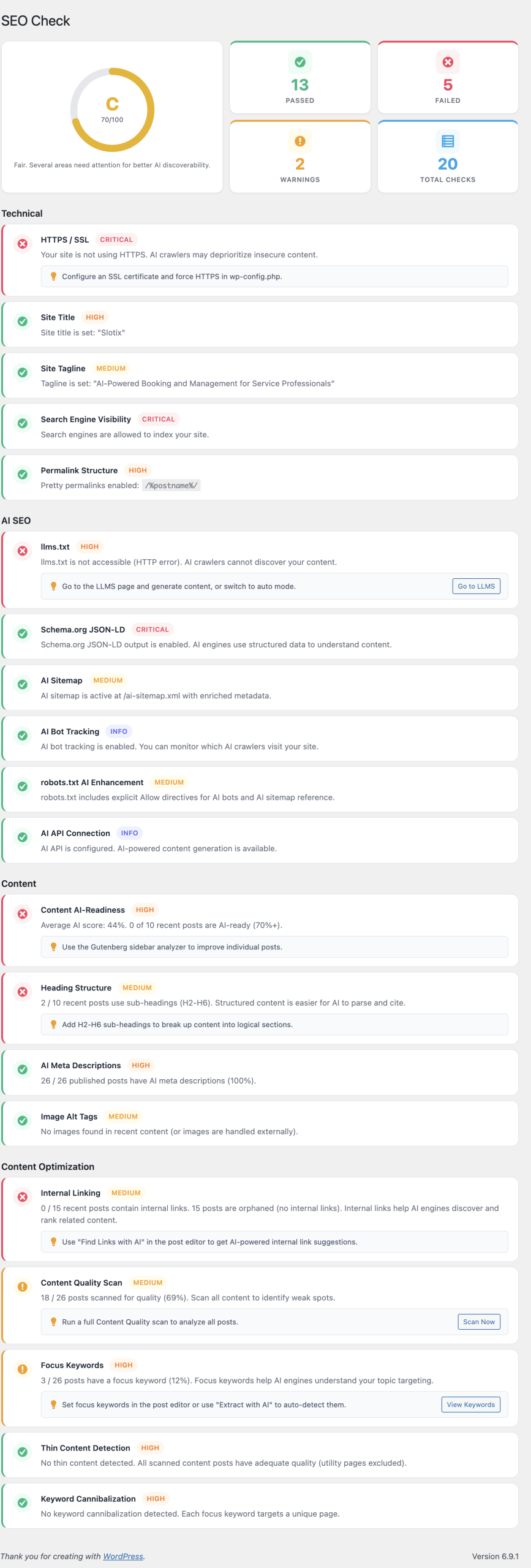
It shows:
- the current overall score with a colored gauge;
- the ten individual checks with pass/warn/fail badges;
- a one-click Optimize with AI button that opens the rewriter.
Content Optimization
The optimizer is a guided experience that takes the failing checks and asks the configured LLM to fix them while staying within the chosen tone and the post’s voice.
The proposed rewrite is shown side-by-side with the original; you accept, reject or edit each suggested block before publishing. Nothing is saved automatically.
Focus keywords
Focus keywords are assigned in the meta box. The plugin then tracks them across the library and surfaces conflicts where multiple posts compete for the same term.
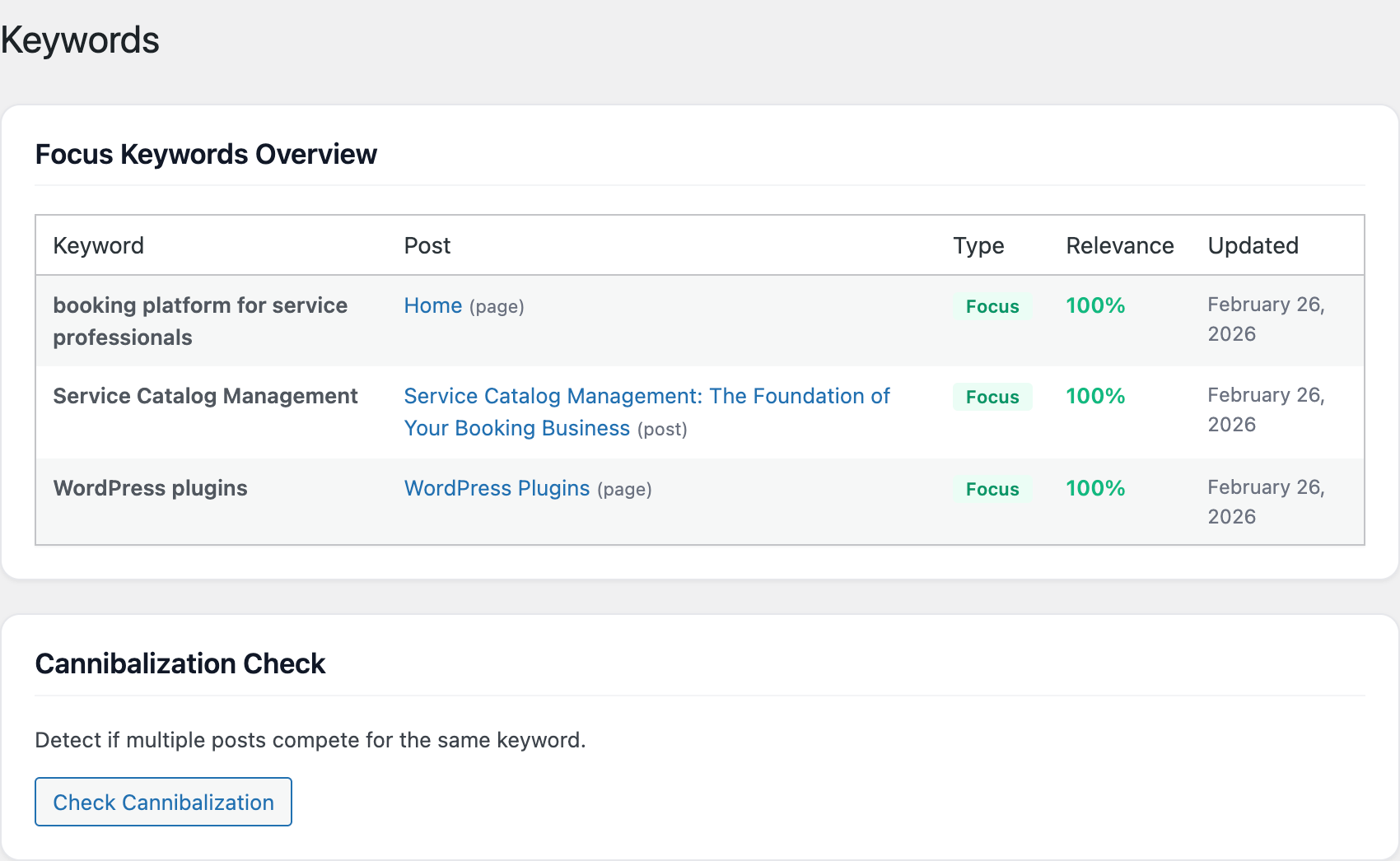
For each cannibalization conflict you get:
- the list of competing URLs;
- a recommendation to merge, redirect or differentiate;
- the option to mark the conflict as resolved once you act on it.
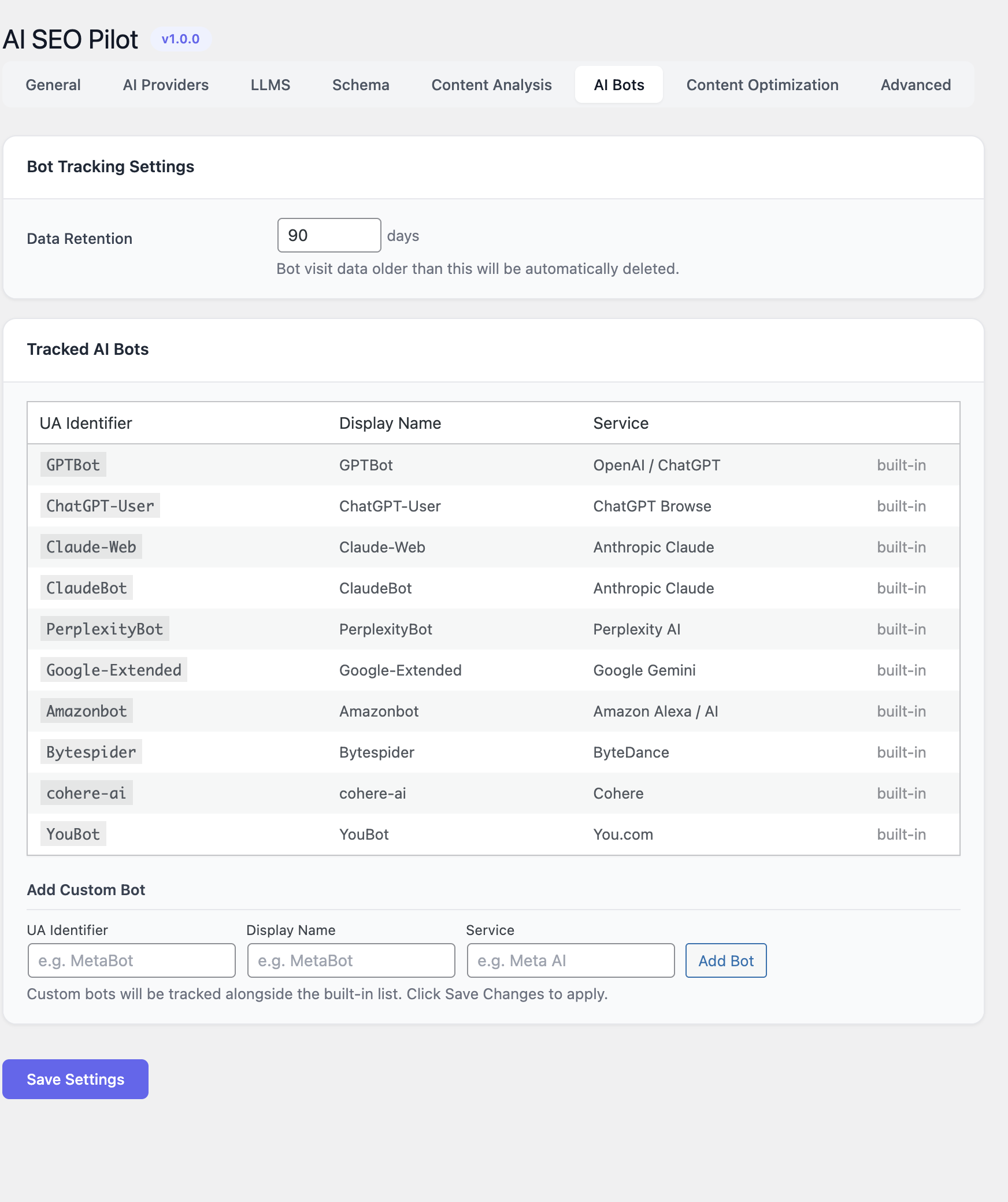
AI Bots tab
Open AI SEO Pilot → AI Bots to review crawler activity over the retention window. Useful patterns to look for:
- A new bot appearing — the AI ecosystem grows monthly.
- A drop in GPTBot or ClaudeBot — usually a sign that
llms.txtorrobots.txtis blocking them, or that the site returned 5xx errors. - A surge in
ChatGPT-UserorPerplexity-User— those are user-triggered fetches, a leading indicator of being cited in answers.
Screenshots
FAQ
What is the difference between SEO and AEO?
Traditional SEO is about ranking in a list of ten blue links on a search engine results page. AEO — AI Engine Optimization, also called GEO, Generative Engine Optimization — is about being cited inside the answer generated by a large language model. Both share fundamentals (clean HTML, semantic markup, fast pages) but AEO puts more weight on structured data, explicit Q&A patterns, citable statistics and a machine-readable site index (llms.txt).
Will AI SEO Pilot conflict with Yoast SEO, Rank Math or All in One SEO?
No. AI SEO Pilot focuses on the AEO side and does not touch meta titles, meta descriptions or canonical URLs. You can keep your traditional SEO plugin in place. If your SEO plugin already outputs Organization or WebSite JSON-LD you can disable those types in AI SEO Pilot to avoid duplication.
Do I have to bring my own API key?
Yes. AI SEO Pilot is BYOK (bring-your-own-key) so you control costs and data residency. Any of the supported providers works — OpenAI, Anthropic, Google Gemini, DeepSeek or a local Ollama instance.
Does the plugin send my content to a third party?
Only when you explicitly run the analyzer or the optimizer, and only to the AI provider you configured. Bot tracking, JSON-LD generation, llms.txt and the AI sitemap are 100% local. If you need fully on-premise operation, use the Ollama provider.
Where can I find my llms.txt file?
At the root of your domain: https://<your-site>/llms.txt. The plugin serves it via a virtual route, so it works on any permalink structure and on multisite installs.
Why does my content quality score drop after I edit a post?
The score is recomputed when the post is saved. New paragraphs may have lowered entity density or removed a list that contributed to the Lists check. Open the AI SEO Check meta box and look at the per-check breakdown to see which signal regressed.
Can I track custom AI bots?
Yes. The AI Bots Tracking tab accepts custom User-Agent fragments. Provide the fragment, a display name and a service grouping; matching requests are recorded going forward.
How long is tracking data kept?
Raw hits respect the retention you set (7 to 365 days). Daily aggregated counters are kept indefinitely so the dashboard always has historical context.
Is the plugin GDPR-compliant?
The tracking module only logs server-side bot hits, never visitor PII. No cookies, no localStorage, no fingerprinting. When you call an external AI provider, the provider’s own data-processing terms apply.
Does it work with WPML or Polylang?
Yes. Each translation of a post is treated as an independent piece of content and scored against the threshold. JSON-LD is emitted per-language. llms.txt includes all locales when auto-generated.
Troubleshooting
The license key says “invalid”
- Make sure there are no leading or trailing spaces in the key.
- Confirm the site URL matches the one registered in your Slotix account.
- If you moved the site, deactivate the license on the old domain first.
”Test Connection” fails on the AI Providers tab
- Verify the API key is active and has billing credits enabled.
- Check whether your host blocks outbound HTTPS to
api.openai.com,api.anthropic.com, etc. Whitelist the provider domain. - For Ollama, confirm the endpoint is reachable from the WordPress server itself (not just from your laptop).
llms.txt returns a 404
- Visit Settings → Permalinks and click Save Changes to flush rewrite rules.
- If a security plugin blocks unknown root paths, add
/llms.txtto its allowlist.
JSON-LD is not appearing in page source
- Confirm that the Schema.org master switch is enabled in General.
- Check that no caching plugin is stripping
<script type="application/ld+json">blocks. - Some optimization plugins move scripts to the footer; AI SEO Pilot expects JSON-LD in the
<head>.
No bots show up in the analytics
- The AI Visibility module must be enabled in General.
- Bot hits accumulate over time; expect a quiet first 24 hours on low-traffic sites.
- A reverse proxy or CDN may rewrite the User-Agent. Configure the CDN to forward the original UA header.
Content analysis is slow
- Large batch scans are paginated and run via WP-Cron. If WP-Cron is disabled on your host, trigger it externally with a system cron pointing at
wp-cron.php. - Switch to a smaller, faster model (for example GPT-4o-mini or Claude Haiku) for routine scoring; reserve the larger models for the optimizer.
A post is stuck below the AI-Ready Threshold
- Open the per-check breakdown to see which signal is failing.
- Use Optimize with AI to generate a targeted rewrite for the failing checks only.
- If a specific check is structurally not applicable to your content (for example Lists on a poem), lower its weight in Content Analysis rather than rewriting the post.