Invoice Pilot
Invoice Pilot extends WooCommerce with country-aware invoicing for the 27 EU member states. It captures the right billing fields at checkout (Italian SDI / PEC codes, French SIRET, German Leitweg-ID, Polish NIP, Romanian CUI, and so on), then issues immutable PDF and XML invoices, credit notes, proformas and quotes from the order. The PDF is rendered with mPDF; the XML envelope is picked automatically from the buyer’s country and covers eleven national profiles including FatturaPA (IT), XRechnung (DE), KSeF FA(2) (PL), Factur-X (FR), CIUS_RO (RO), Facturae (ES) and UBL 2.1 / PEPPOL BIS 3.0 as the generic fallback.
Beyond the document engine, Invoice Pilot ships first-class integrations with six accounting providers — SmartBill (Romania), Fatture in Cloud (Italy), Xero, QuickBooks Online, Fortnox (Sweden) and Sage — a VAT validator that consults the European VIES service with a per-country format fallback, a dashboard with KPI cards and trend charts, and an optional multi-provider AI layer (Anthropic Claude, OpenAI, Google Gemini, DeepSeek, Grok xAI) for checkout smart-fill, compliance pre-flight, line translation and natural-language document search. The plugin also supports WordPress Multisite with per-site tables and a network-wide overview page.
Highlights
- WooCommerce-driven document lifecycle for invoices, credit notes, proformas and quotes, with reserved numbering series, a clean issue / regenerate / reissue / void / credit-note flow, and per-document-type styling (disclaimer banner on non-fiscal docs, “Valid until” labels on quotes, “Refund total” on credit notes, payment block hidden on quote and credit note).
- EU-27 country-specific billing fields registered against both the legacy shortcode checkout and the WooCommerce 8.6+ block checkout (via the Additional Checkout Fields API).
- PDF rendering through mPDF using one of three bundled templates (Minimal, Classic, Modern), with picker for accent colour, text colour, font family and seller logo.
- Eleven XML writers, dispatched automatically from the buyer country: FatturaPA (IT), Factur-X / CII (FR), XRechnung 3.0 (DE), KSeF FA(2) (PL), CIUS_RO 1.0.0 (RO), Facturae 3.2.2 (ES), SAF-T PT (PT), OIOUBL (DK), Finvoice 3.0 (FI), ebInterface 6.1 (AT), myDATA InvoicesDoc (GR / EL), with UBL 2.1 / PEPPOL BIS 3.0 as the universal fallback.
- VAT validation chain combining the European VIES SOAP service with offline per-country regex validation, a DB-backed cache and an hourly cron that revalidates stale entries.
- Six accounting integrations — SmartBill, Fatture in Cloud, Xero, QuickBooks Online, Fortnox and Sage — each with encrypted credentials, push / status / void operations and a retry queue. The Integrations settings tab uses a sticky provider selector so the panel you were configuring stays open across saves.
- Optional AI layer with five providers (Anthropic, OpenAI, Google Gemini, DeepSeek, Grok xAI) covering smart-fill, compliance check, line translation and natural-language search; the plugin works fully without an API key.
- Dashboard with period selector, five KPI cards and two trend charts; a separate Integration Log records every push and failure.
- WordPress Multisite support — each sub-site has its own tables, settings and numbering counters, with a network admin page that aggregates statistics.
- MCP integration — when the sibling Agent Pilot
plugin is installed, Invoice Pilot contributes three MCP tools to
the secure agent server:
invoice_list,invoice_getandinvoice_create. They let any MCP-aware AI client (Claude Desktop, GPT-Agents, …) query and emit documents through the same REST surface the admin UI uses, with the same capabilities check.
Requirements
| Component | Minimum |
|---|---|
| WordPress | 5.8 (tested up to 7.0) |
| PHP | 8.0 |
| WooCommerce | 7.0 |
| Database | MySQL 5.7 or MariaDB 10.2 (the dashboard SQL uses JSON_EXTRACT / JSON_UNQUOTE against the immutable snapshot column) |
The block-checkout integration is registered against the WooCommerce
Additional Checkout Fields API (introduced in WooCommerce 8.6). On
older WooCommerce versions the legacy woocommerce_billing_fields
filter still adds VAT, tax-code and country-specific fields to the
shortcode checkout, so the plugin degrades gracefully.
Installation
- Download the latest Invoice Pilot ZIP from the GitHub Releases page.
- In WordPress, open Plugins → Add New → Upload Plugin.
- Choose the ZIP and click Install Now.
- Click Activate Plugin.
- Open Invoice Pilot → Settings to configure the seller, numbering series and optional integrations.
Activation creates the plugin’s database tables, installs the default
settings and seeds five numbering series (one per document type):
INV (invoice, default), REC (receipt), CN (credit note), PRO
(proforma) and Q (quote), all using the YYYY-NNNN pattern with a
yearly reset. Four cron jobs are also scheduled: daily log cleanup,
fifteen-minute retry of failed integration pushes, hourly VIES
revalidation and daily Fatture in Cloud token refresh.
On WordPress Multisite, the same per-site bootstrap runs automatically
when a new sub-site is created (wp_initialize_site).
Configuration
All Invoice Pilot screens live under the top-level Invoice Pilot menu in the WordPress admin sidebar:
- Dashboard — KPI cards and trend charts.
- Documents — modern data-grid listing every issued document (invoice, credit note, proforma, quote, receipt) with a unified toolbar (AI search + type filter), colour-coded status pills (paid / void / converted / draft / issued), 20-row pagination and inline PDF / XML / Delete actions.
- Settings — eight-tab configuration page (documented below).
- Log — integration log entries with retention and a manual cleanup action.
The Settings page is split into the following tabs, in the order they appear in the UI:
- General
- Series
- Document types
- Templates
- VAT validation
- Integrations
- AI
- Advanced
General
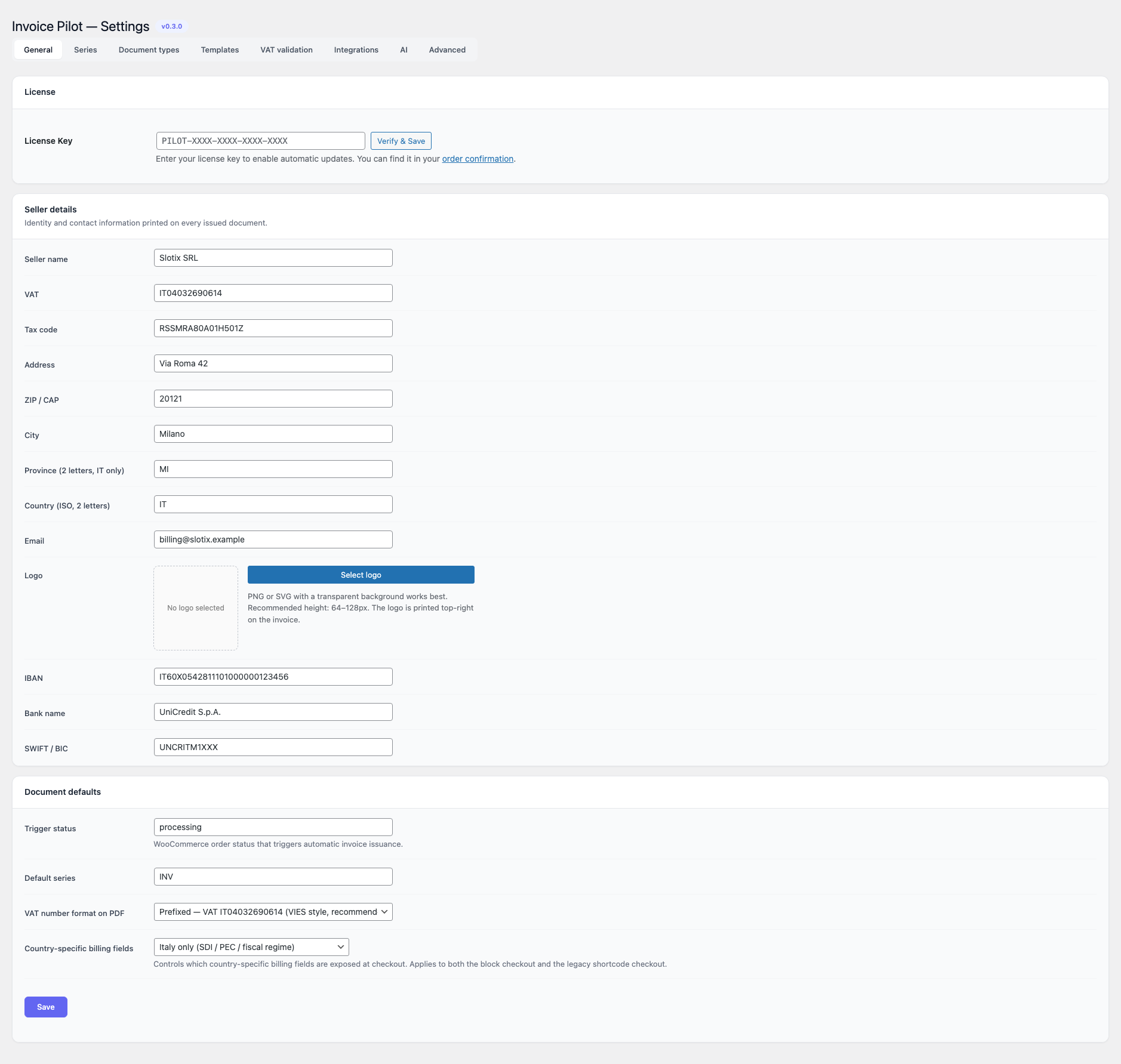
The General tab is split into three cards: License, Seller details and Document defaults.
License
| Field | Notes |
|---|---|
| License Key | Paste the PILOT-XXXX-XXXX-XXXX-XXXX key from your order confirmation email and press Verify & Save to enable automatic plugin updates from the GitHub release feed. The plugin still issues documents without a key; only the auto-update channel is gated. |
Seller details carries the identity printed on every issued document; Document defaults carries a small number of WooCommerce-level defaults.
| Field | Default | Notes |
|---|---|---|
| Seller name | empty | Free text. |
| VAT | empty | Seller VAT identifier. |
| Tax code | empty | Italian codice fiscale or equivalent. |
| Address | empty | Street. |
| ZIP / CAP | empty | Postal code. |
| City | empty | |
| Province (2 letters, IT only) | empty | Force-uppercased on save. |
| Country (ISO, 2 letters) | IT | ISO-3166-1 alpha-2; force-uppercased. |
| empty | Validated as an email address. | |
| Logo | empty | Picked from the WordPress Media Library. PNG or SVG with a transparent background works best; recommended height 64–128px. The logo is printed top-right on the invoice. |
| IBAN | empty | Used by writers that emit payment instructions. Printed in the invoice footer and embedded in FatturaPA <DatiPagamento>. |
| Bank name | empty | Free text — printed under the IBAN in the invoice footer and emitted as <IstitutoFinanziario> inside the FatturaPA <DettaglioPagamento> block. |
| SWIFT / BIC | empty | 8 or 11 alphanumeric characters; uppercased and stripped of whitespace on save. Printed alongside the IBAN and emitted as <BIC> in FatturaPA. |
| Trigger status | processing | WooCommerce order status that triggers automatic invoice issuance. Allowed values: processing, completed, on-hold, pending. |
| Default series | INV | Slug of the numbering series used for new invoices. |
| VAT number format on PDF | Prefixed — VAT IT04032690614 (VIES style, recommended) | How the seller VAT is printed on the rendered invoice and PDF preview. Choices: Prefixed (country code in front of the number, mirroring the VIES-style format), Bare (number only, as typed in Seller details → VAT). Defaults to Prefixed. |
| Country-specific billing fields | Italy only (SDI / PEC / fiscal regime) | Tri-state selector controlling which country-specific billing fields are exposed at checkout. Choices: Off — only universal VAT and tax-code shown, Italy only (SDI / PEC / fiscal regime), All EU-27 country-specific fields. Applies to both the block checkout and the legacy shortcode checkout. Every field carries a translatable label (e.g. SDI recipient code, Certified email (PEC), SIRET, Steuernummer) — the old raw snake_case names are gone. |
Series
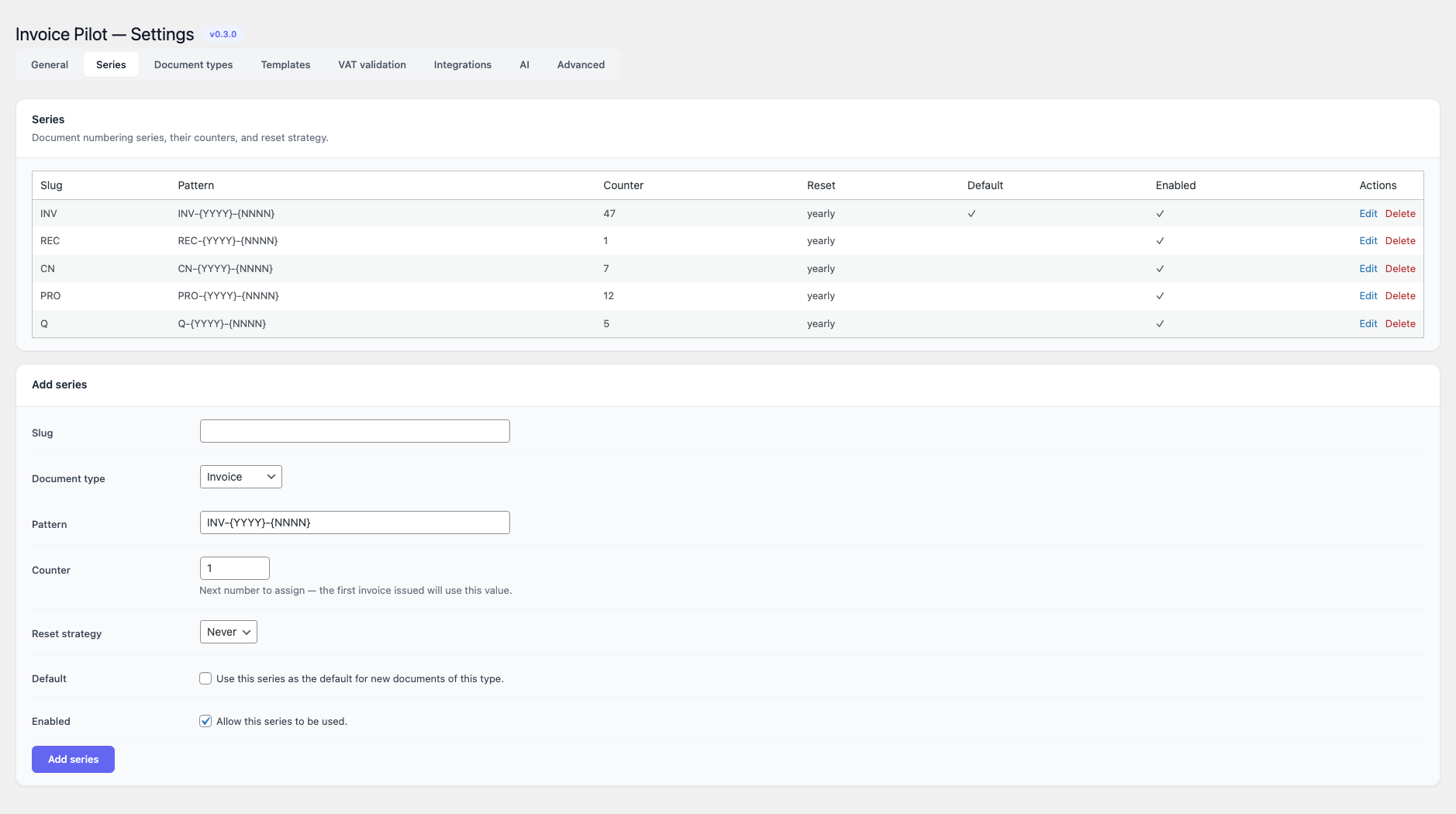
The Series tab is a CRUD table over the numbering series stored in
the plugin’s own series table. Each row controls how documents of a
given type are numbered.
Columns: Slug, Pattern, Counter, Reset, Default, Enabled, Actions (Edit / Delete).
The Add / Edit form exposes:
| Field | Allowed values | Default |
|---|---|---|
| Slug | Lowercase identifier. Must be unique. | empty |
| Document type | invoice, receipt, credit_note, proforma, quote. | invoice |
| Pattern | Free text; placeholders {YYYY} (year) and {NNNN} (counter) are expanded at issue time. | INV-{YYYY}-{NNNN} |
| Counter | Integer, one or higher. Next number to assign — the very next document issued from this series will use this exact value (so Counter = 47 issues INV-2026-0047 next, not INV-2026-0048). | 1 |
| Reset strategy | never, yearly. | never |
| Default | Boolean — mark this series as the default for new documents of this type. | off |
| Enabled | Boolean — allow this series to be used. | on |
Renaming a slug updates the series row in place (preserving the
integer id and any references) and migrates the default_series
setting automatically if it pointed at the old slug. Deleting a
series does not remove existing documents; they keep their
numbers.
Document types
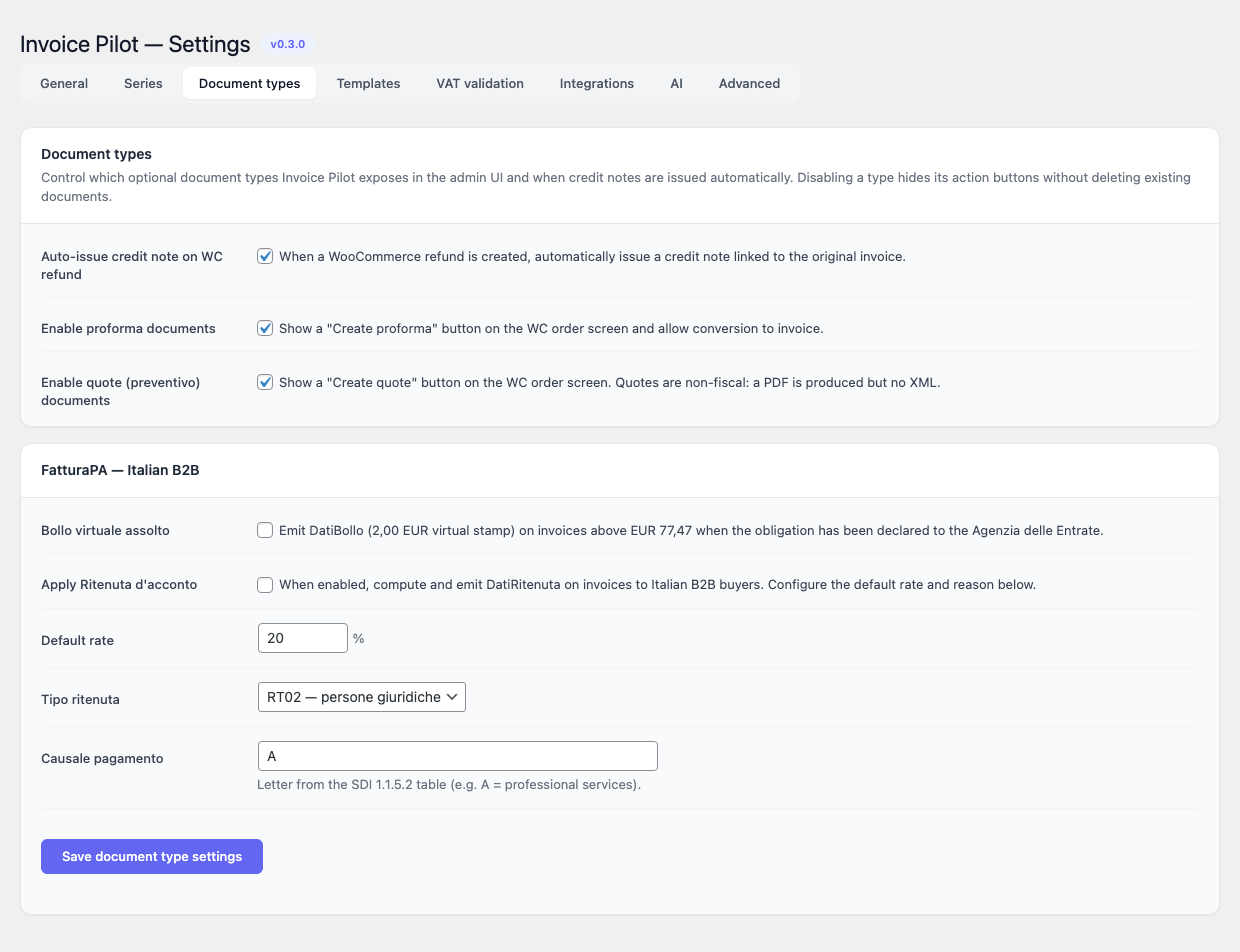
The Document types tab toggles optional document types and exposes the FatturaPA-specific bollo and ritenuta settings.
Document types card
| Toggle | Default | Description |
|---|---|---|
| Auto-issue credit note on WC refund | on | When a WooCommerce refund is created, automatically issue a credit note linked to the original invoice. |
| Enable proforma documents | on | Show a “Create proforma” button on the WC order screen and allow conversion to invoice. |
| Enable quote (preventivo) documents | on | Show a “Create quote” button on the WC order screen. Quotes are non-fiscal: a PDF is produced but no XML. |
FatturaPA — Italian B2B card
| Field | Default | Description |
|---|---|---|
| Bollo virtuale assolto | off | Emit DatiBollo (2,00 EUR virtual stamp) on invoices above EUR 77,47 when the obligation has been declared to the Agenzia delle Entrate. |
| Apply Ritenuta d’acconto | off | Compute and emit DatiRitenuta on invoices to Italian B2B buyers. |
| Default rate | 20.00 % | 0–100, step 0.01. |
| Tipo ritenuta | RT02 | RT01 (persone fisiche) or RT02 (persone giuridiche). |
| Causale pagamento | A | Single uppercase letter from the SDI 1.1.5.2 table (e.g. A = professional services). |
Templates
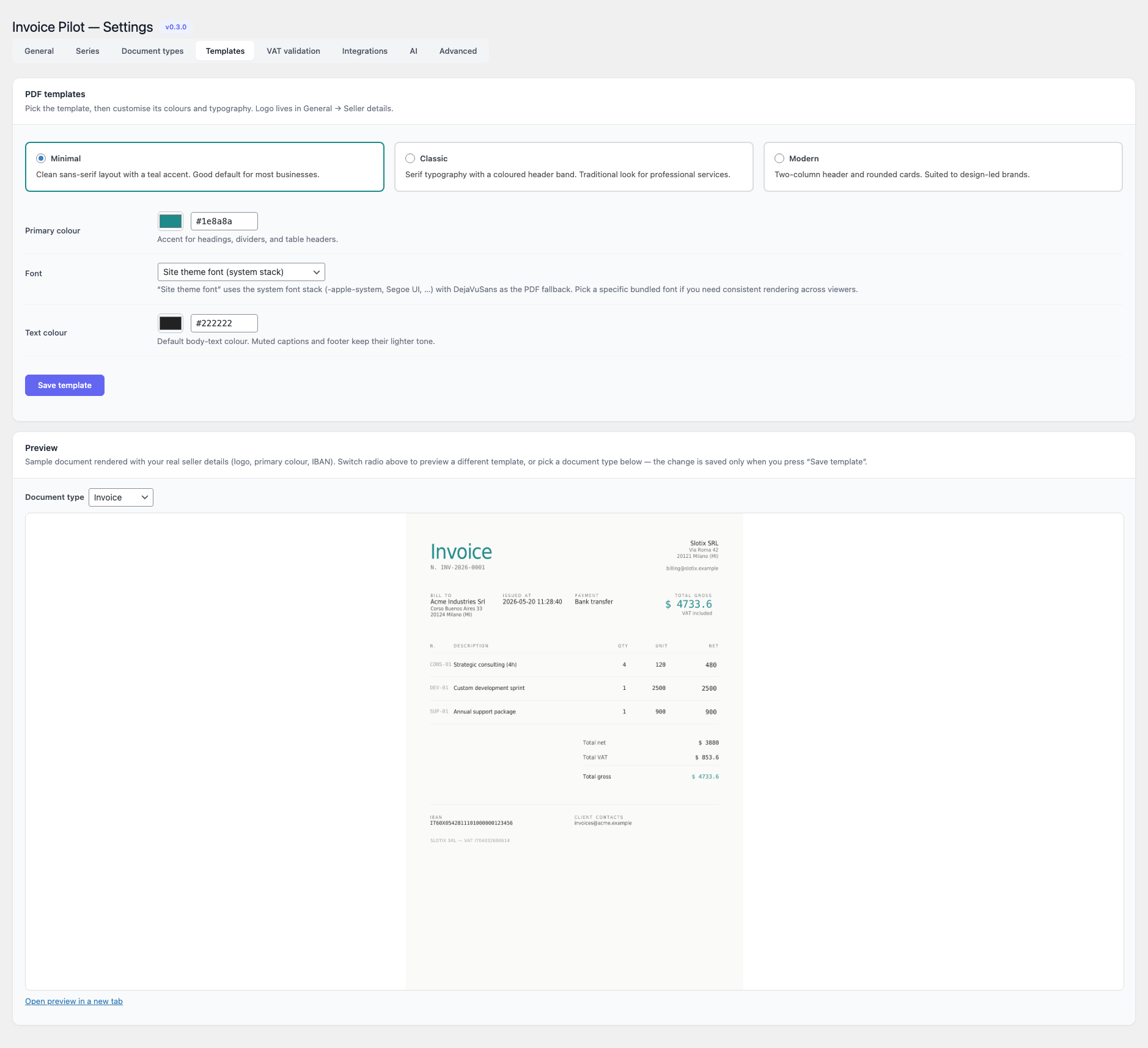
Pick one of three bundled PDF templates and customise its colours and typography.
| Template | Description |
|---|---|
| Minimal | Clean sans-serif layout with a teal accent. Default. |
| Classic | Serif typography with a coloured header band. Traditional look for professional services. |
| Modern | Two-column header and rounded cards. Suited to design-led brands. |
Additional fields:
| Field | Default | Notes |
|---|---|---|
| Primary colour | #1e8a8a | Native HTML5 colour picker; accent for headings, dividers and table headers. |
| Font | Site theme font (system stack) | One of: default, dejavusans, dejavuserif, dejavusansmono, helvetica, times, courier. The default value uses the site’s system font stack with DejaVuSans as the PDF fallback. |
| Text colour | #222222 | Default body-text colour. Muted captions and footers keep their lighter tone. |
The tab also embeds a live PDF preview (rendered against the
/wp-json/invoice-pilot/v1/preview-template REST endpoint) so you can
compare templates side-by-side before saving. Changing the radio
swaps the iframe immediately; the choice persists only when you press
Save template.
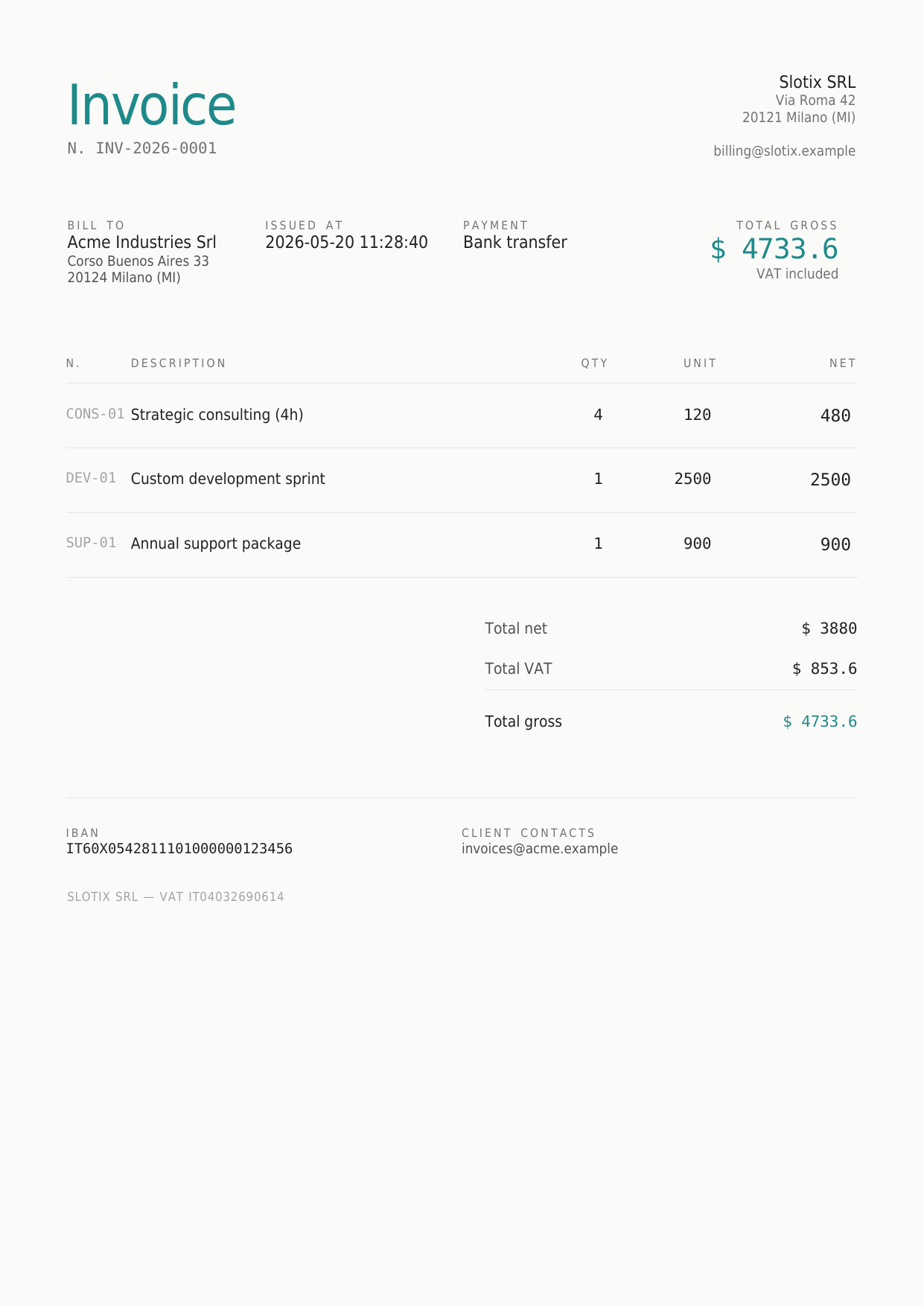
A Document type selector sits above the iframe so you can preview
how each of the four document types is rendered — invoice,
credit_note, proforma, quote — with the same template, sample
seller and sample buyer. The differences applied per type are:
| Type | Title | Number prefix | Status pill | Disclaimer banner | Payment / IBAN |
|---|---|---|---|---|---|
invoice | Invoice | INV- | ISSUED | — | shown |
credit_note | Credit note | CN- | CREDIT NOTE | Refund of INV-… | hidden |
proforma | Proforma | PRO- | PROFORMA | Proforma — not a fiscal document. | shown |
quote | Quote | Q- | QUOTE | Quote — not a fiscal document, subject to acceptance. | hidden |
Quotes additionally relabel the prominent “Issued” / “Due date” cells
to Valid until, and rename the hero total to Estimated total;
credit notes rename it to Refund total. These differences come
from a per-type label override map and a doc_type_context() helper
fed into the template engine, so the three bundled designs
(Minimal / Classic / Modern) keep a consistent visual identity across
document types without duplicating template files.
The footer always carries the buyer country in its full English
form (e.g. Germany, not DE) — the ISO code from the order is
resolved through PHP’s Locale::getDisplayRegion() before render,
which keeps the rendered invoice readable for human buyers and tax
auditors. The seller VAT itself is printed according to VAT number
format on PDF in General → Document defaults — defaulting to the
VIES-style prefixed form (VAT IT04032690614), with a Bare option
for jurisdictions that prefer the bare number.
The dispatcher that picks the right XML envelope per buyer country is
the invoice_pilot_xml_writer_for_country filter, so host code can
override per ISO (see Hooks and filters).
VAT validation
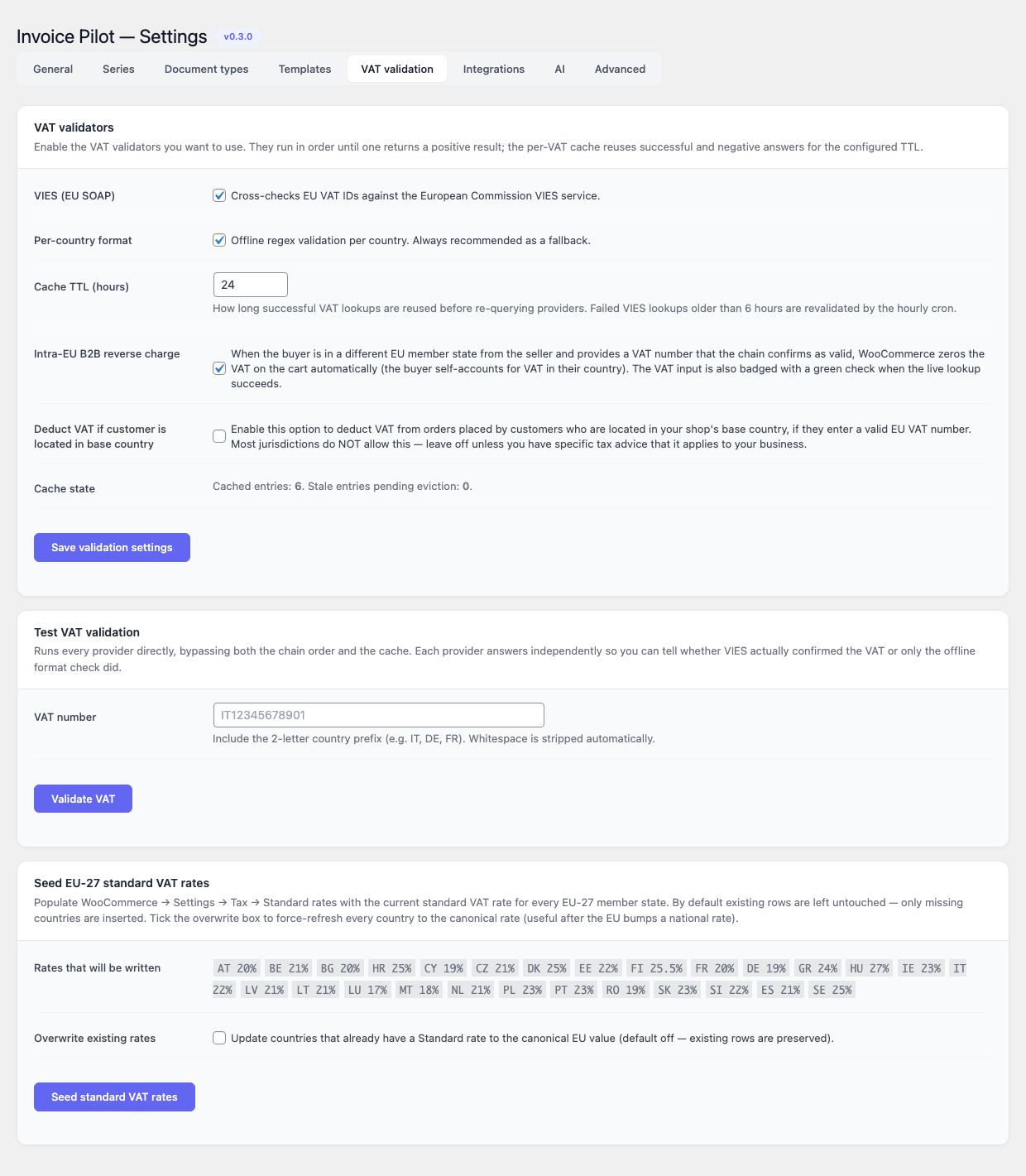
VAT identifiers entered at checkout (and on any address screen that exposes the field) are run through a chain of validators. Each validator is enabled by an independent toggle and runs in order until one returns a positive result; both successful and negative answers are cached for the configured TTL.
| Validator | Default | Description |
|---|---|---|
| VIES (EU SOAP) | on | Cross-checks EU VAT IDs against the European Commission VIES service. |
| Per-country format | on | Offline regex validation per country. Always recommended as a fallback. |
| Field | Default | Range / Notes |
|---|---|---|
| Cache TTL (hours) | 24 | 1 – 720. Failed VIES lookups older than 6 hours are revalidated by the hourly cron. |
| Intra-EU B2B reverse charge | on | When the buyer is in a different EU member state from the seller and supplies a VAT number that VIES confirms as registered, WooCommerce zeros the VAT on the cart automatically (the buyer self-accounts in their own country). The VAT input also gains a live green ✓ badge when the lookup succeeds and a red ✕ when it fails. The format-only validator does NOT trigger the exemption — a regex match only proves the number is well-formed, not that the VAT registration actually exists in VIES. Without this guard, any plausible-looking but unregistered number would silently bypass tax. If VIES is temporarily unreachable the chain falls through to format for acceptance (so checkout doesn’t break), but the supply stays taxed until VIES confirms. |
| Deduct VAT if customer is located in base country | off | Most jurisdictions do NOT allow this — leave off unless you have specific tax advice that says it applies to your business. When on, a valid in-country B2B VAT triggers the reverse-charge deduction even on domestic sales. |
A read-only Cache state row reports the number of cached entries and how many have expired and are pending eviction.
Test VAT validation — a small tester card below the settings card runs every provider directly against a single VAT, bypassing the chain order and the cache, so you can tell whether VIES actually confirmed the number or only the offline format check did.
Seed EU-27 standard VAT rates — the bottom card populates
WooCommerce → Settings → Tax → Standard rates with the current standard
VAT rate for every EU-27 member state (AT 20% BE 21% BG 20% HR 25% CY 19% CZ 21% DK 25% EE 22% FI 25.5% FR 20% DE 19% GR 24% HU 27% IE 23% IT 22% LV 21% LT 21% LU 17% MT 18% NL 21% PL 23% PT 23% RO 21% SK 23% SI 22% ES 21% SE 25%). By default only missing countries are inserted;
tick Overwrite existing rates to force-refresh every row to the
canonical value (useful after the EU bumps a national rate). The card
also lists every (ISO, rate) pair so you can see exactly what will be
written before pressing the button.
Integrations
The Integrations tab renders one panel per registered integration
provider behind a single Provider selector at the top — pick the
provider you want to configure and only its card is visible, the
others stay in the DOM hidden. The selector is sticky across form
saves: when you save a provider’s form (or land on the tab with
?integration=<id> in the URL), the next render keeps that provider
selected, so you don’t get bounced back to whichever provider is
enabled first in the registration order.
By default Invoice Pilot ships six providers; third-party code can
register additional ones through the
invoice_pilot_integration_providers filter.
Every provider panel is closed by a Connection Status card with a Test Connection button. The button issues a lightweight request against the saved credentials and prints the upstream response — save the form first if you have just pasted new tokens.
SmartBill
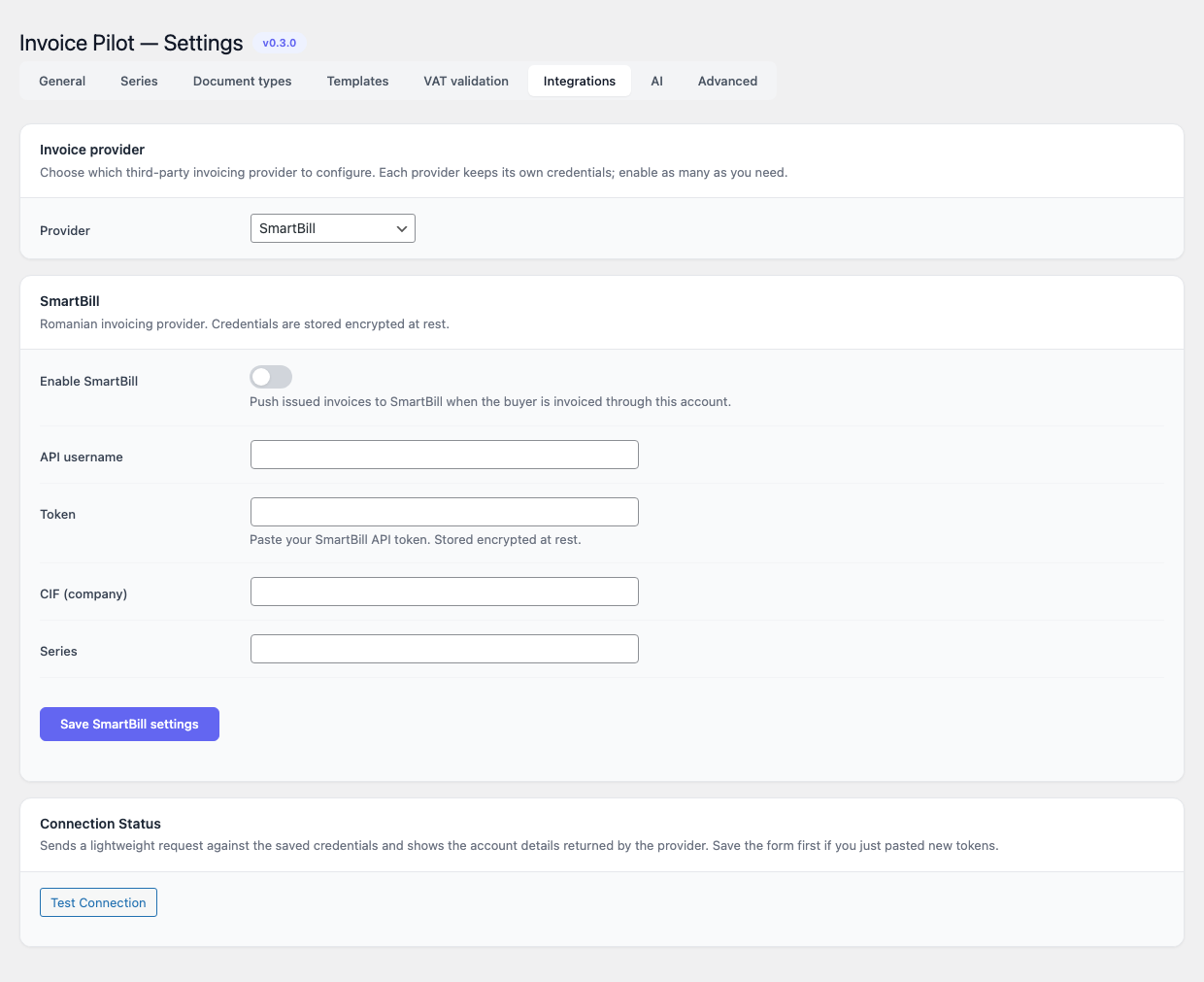
Romanian invoicing provider. Credentials are encrypted at rest using the plugin’s symmetric crypto layer.
| Field | Default | Notes |
|---|---|---|
| Enable SmartBill | off | Push issued invoices to SmartBill as soon as they are emitted. |
| API username | empty | The username you use to sign in to SmartBill. |
| Token | empty | Paste your SmartBill API token. The stored value is encrypted; leave the field blank on subsequent saves to keep it. |
| CIF (company) | empty | Romanian company VAT code. |
| Series | empty | SmartBill series used for pushed invoices. |
When enabled, Invoice Pilot calls POST /SBORO/api/v2/invoice on
issuance, then pull_status to reconcile and void when an invoice
is cancelled.
Fatture in Cloud
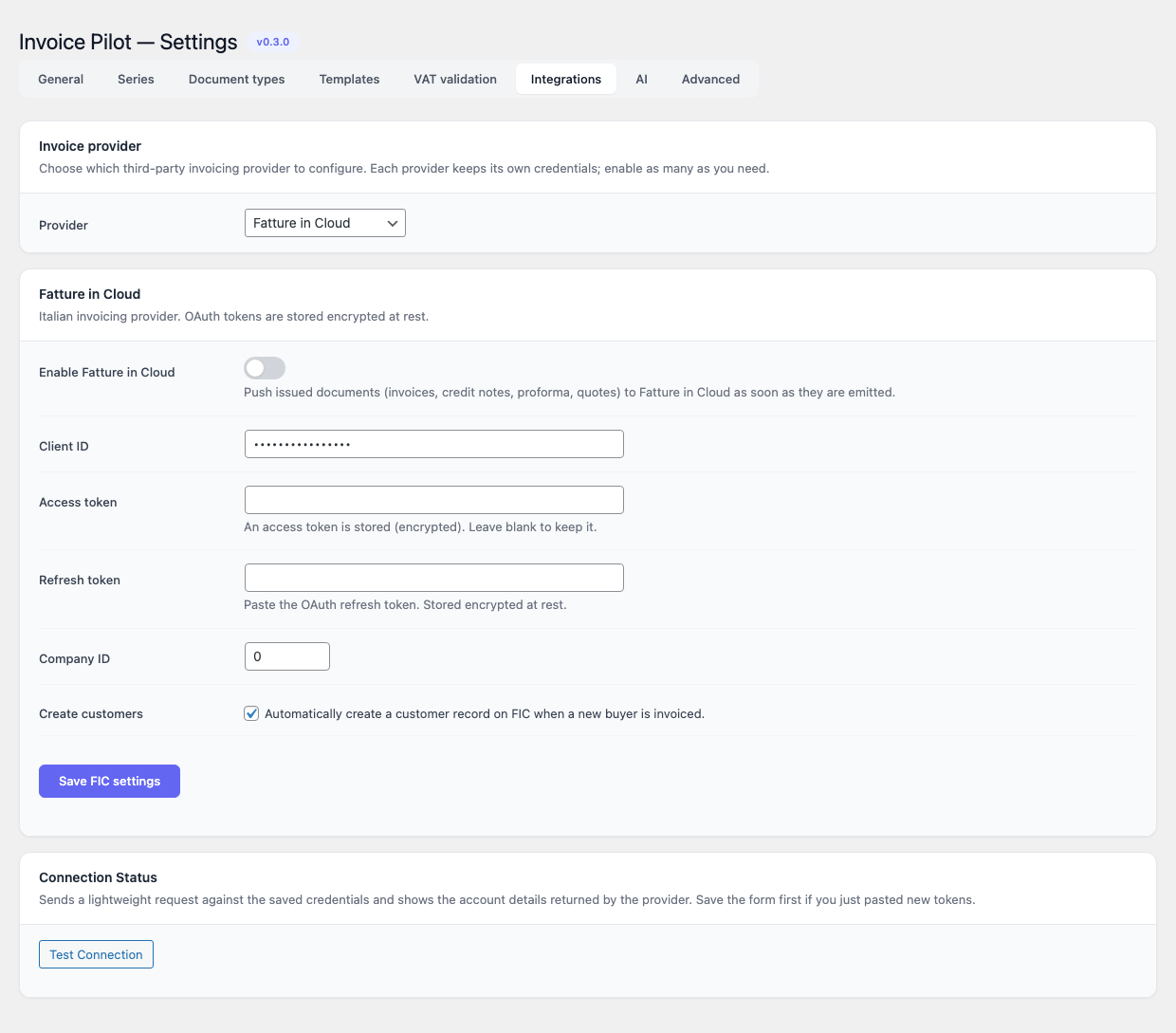
Italian invoicing provider. OAuth tokens are stored encrypted at
rest. The daily invoice_pilot_refresh_fic_token cron refreshes the
access token automatically when the integration is enabled.
| Field | Default | Notes |
|---|---|---|
| Enable Fatture in Cloud | off | Push issued documents (invoices, credit notes, proforma, quotes) to Fatture in Cloud as soon as they are emitted. |
| Client ID | empty | OAuth client identifier. |
| Access token | empty | Paste the OAuth access token. The stored value is encrypted; leave the field blank on subsequent saves to keep it. |
| Refresh token | empty | Same handling as the access token. |
| Company ID | 0 | Numeric company identifier in your Fatture in Cloud account. |
| Create customers | on | Automatically create a customer record on FIC when a new buyer is invoiced. |
Per the Fatture in Cloud product policy, Invoice Pilot does not submit FatturaPA to the SDI on your behalf. SDI submission is left to a separate manual step from inside your FIC account.
Xero
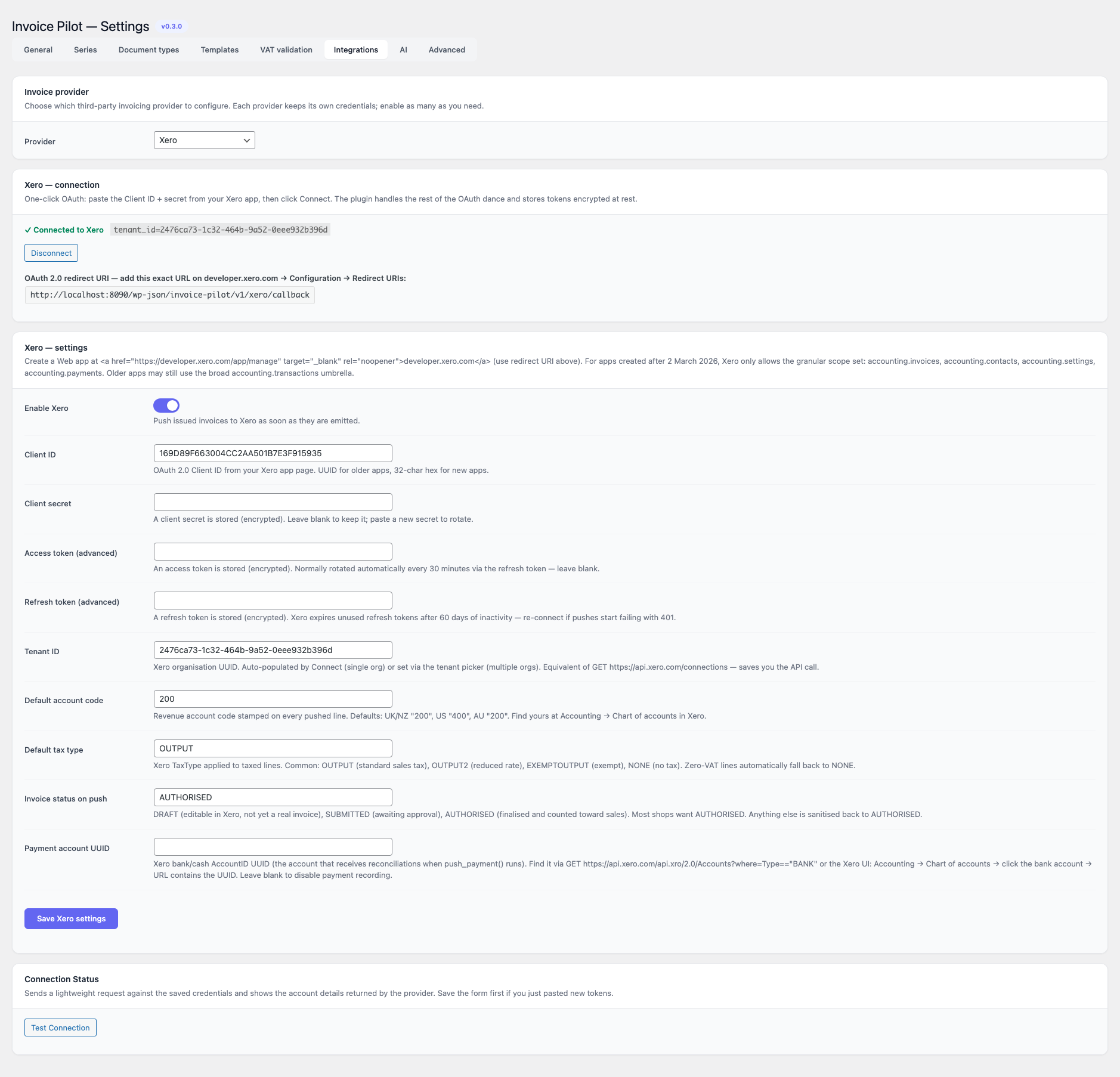
Global accounting platform. OAuth 2.0 tokens are encrypted at rest. The settings tab is laid out as Connection (status + Connect / Disconnect buttons) on top and Settings (app credentials + push behaviour) below.
Connecting
Invoice Pilot ships with a built-in OAuth flow — you no longer have to do the dance in Postman and paste four strings into the form. The end-to-end setup is:
- Create a Web app on developer.xero.com with the redirect URI printed in the Connection panel — copy it verbatim, Xero matches it character-by-character. Apps created after 2 March 2026 can only request the granular scope set; Invoice Pilot picks the right one automatically.
- Generate a Client secret on the Xero app page (Xero shows it only once), then paste Client ID and Client secret into the Settings form and save.
- Click Connect to Xero. You’ll be sent through the standard consent screen and, if your account authorises more than one organisation, you’ll be redirected to an in-card picker to choose the target tenant. Tokens are exchanged + persisted automatically.
- Disconnect clears the access + refresh tokens and the tenant id while keeping the app credentials around for an easy reconnect.
Pushes use POST /Invoices with the standard Idempotency-Key
header derived from the local invoice id + number, so a network retry
collapses to the same Xero InvoiceID instead of creating a
duplicate. The refresh token rotates automatically on 401; if it ever
expires (Xero invalidates refresh tokens after 60 days of
inactivity) just hit Connect again.
Fields
| Field | Default | Notes |
|---|---|---|
| Enable Xero | off | Push issued documents to Xero as soon as they are emitted. |
| Client ID / Client secret | empty | OAuth 2.0 app credentials from the Xero Developer Portal. Required before Connect can be used. |
| Access token / Refresh token (advanced) | empty | Auto-populated by the Connect button. Only paste manually if you obtained tokens outside this UI. |
| Tenant ID | empty | Xero organisation UUID. Auto-populated by Connect (single org) or set via the in-card tenant picker (multiple orgs). |
| Default account code | 200 | Revenue account code stamped on every pushed line. Region defaults: UK/NZ 200, US 400, AU 200. Find yours under Accounting → Chart of accounts in Xero. |
| Default tax type | OUTPUT | Xero TaxType applied to taxed lines. Common values: OUTPUT (standard sales tax), OUTPUT2 (reduced rate), EXEMPTOUTPUT, NONE. Zero-VAT lines fall back to NONE automatically. |
| Invoice status on push | AUTHORISED | One of DRAFT (editable in Xero, not yet a real invoice), SUBMITTED (awaiting approval), AUTHORISED (finalised). Anything else is sanitised back to AUTHORISED. |
| Payment account UUID | empty | Xero bank/cash AccountID used when registering payments. Find it via GET /api.xro/2.0/Accounts?where=Type=="BANK" or the Xero UI (Chart of accounts → click the bank account → URL contains the UUID). Leave blank to disable payment recording. |
QuickBooks Online
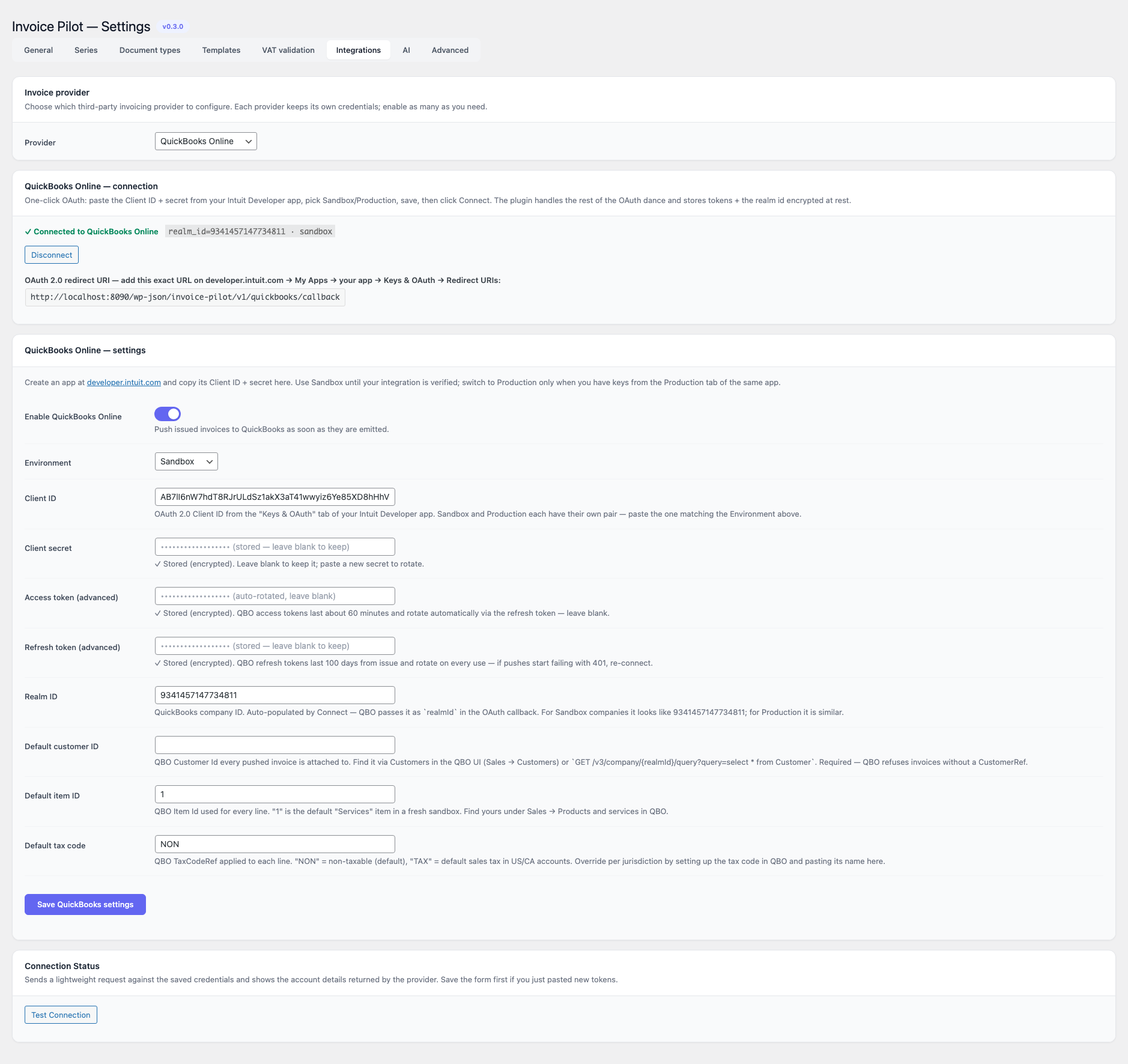
Intuit QuickBooks Online — US / CA / UK / global. OAuth 2.0 tokens are encrypted at rest. The settings tab is laid out as Connection (status + Connect / Disconnect buttons) on top and Settings (app credentials + push behaviour) below.
Connecting
Invoice Pilot ships with a built-in OAuth flow — you no longer have to do the dance in Postman and paste five strings into the form. The end-to-end setup is:
- Create an app on developer.intuit.com
with QuickBooks Online and Payments as the platform and the
com.intuit.quickbooks.accountingscope. Open the Keys & OAuth tab and switch between Development and Production depending on which environment you target — each has its own client_id + secret pair. - Add the redirect URI printed in the Connection panel to the Redirect
URIs list and click Save — Intuit accepts
http://localhostfor Development apps. - Paste Client ID and Client secret into the Settings form, pick the matching Environment (Sandbox / Production) and save.
- Click Connect to QuickBooks. Intuit’s consent screen lets you
pick the company you want the integration to write against; the
chosen
realmIdis returned in the callback URL and saved automatically — there is no separate tenant picker. - Disconnect clears the access + refresh tokens and the realm id while keeping the app credentials around for an easy reconnect.
Every push uses POST /v3/company/{realmId}/invoice with the
requestid query parameter set to a stable per-invoice value — QBO
collapses retried POSTs to the original response, so a network retry
will never create a duplicate. Pushes also carry
minorversion=75 so QBO returns current entity shapes (without it
the API silently downgrades to its 2017-era contract). Refresh tokens
last 100 days from issue and rotate on every use; the plugin handles
the rotation transparently on 401.
Fields
| Field | Default | Notes |
|---|---|---|
| Enable QuickBooks Online | off | Push issued documents as soon as they are emitted. |
| Environment | sandbox | sandbox (default) hits sandbox-quickbooks.api.intuit.com; production hits quickbooks.api.intuit.com. Each environment has its own Client ID + secret on the Intuit app page. |
| Client ID / Client secret | empty | OAuth 2.0 app credentials from the Keys & OAuth tab of your Intuit Developer app. Required before Connect can be used. |
| Access token / Refresh token (advanced) | empty | Auto-populated by the Connect button. QBO access tokens last about 60 minutes and rotate via the refresh token; refresh tokens last 100 days from issue and rotate on every use. Only paste manually if you obtained tokens outside this UI. |
| Realm ID | empty | QuickBooks company ID. Auto-populated by Connect — QBO passes it as realmId in the OAuth callback. Sandbox companies look like 9341457147734811; production realms are similar. |
| Default customer ID | empty | QBO Customer.Id every pushed invoice is attached to. Required — QBO refuses invoices without a CustomerRef. Find it under Sales → Customers in the QBO UI or via GET /v3/company/{realmId}/query?query=select * from Customer. |
| Default item ID | 1 | QBO Item.Id used for every line. 1 is the default “Services” item in a fresh sandbox; find yours under Sales → Products and services. |
| Default tax code | NON | QBO TaxCodeRef applied to each line. NON = non-taxable (default), TAX = default sales tax in US/CA accounts. Override per jurisdiction by setting up the tax code in QBO and pasting its name here. |
Fortnox
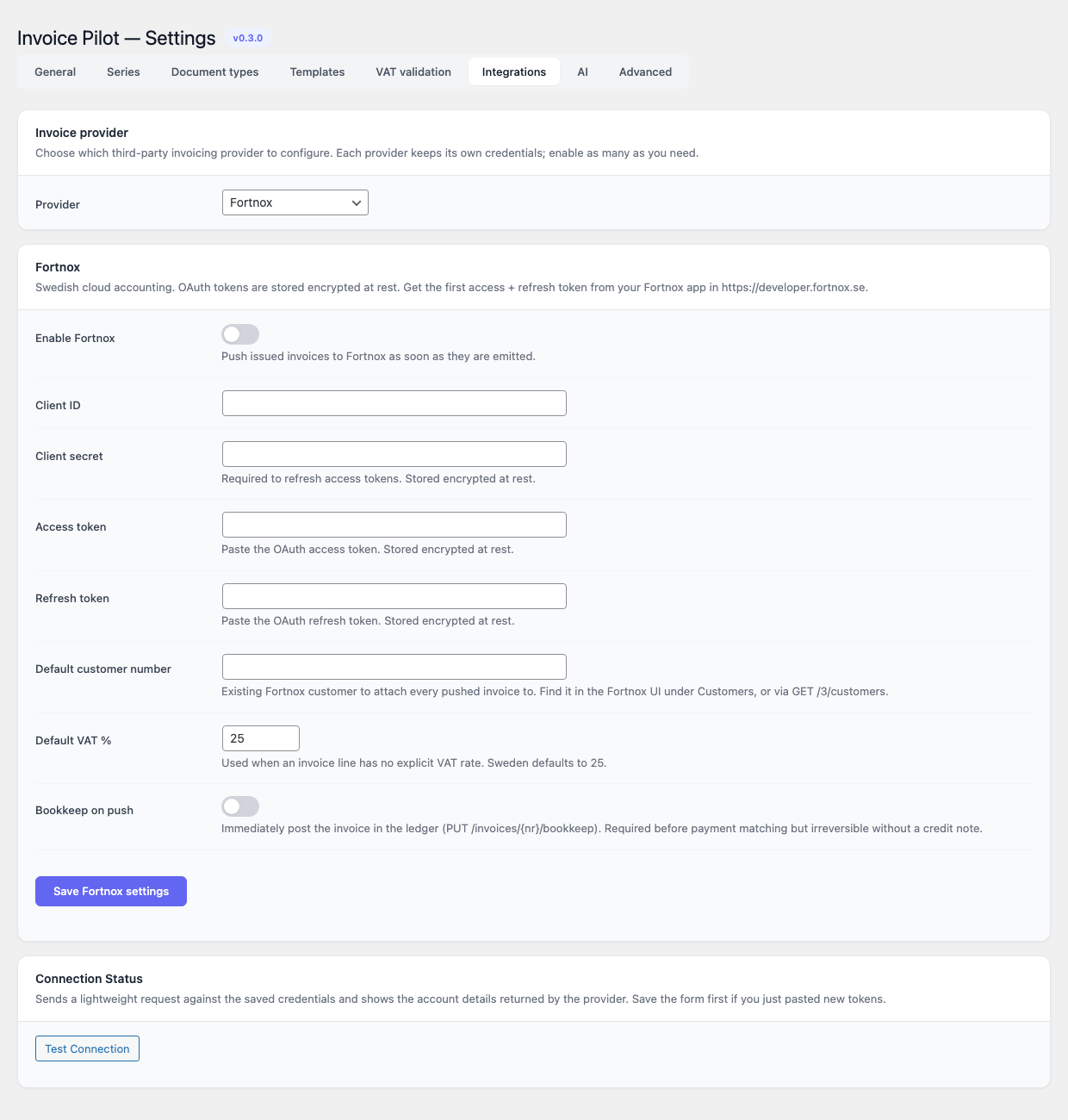
Swedish accounting platform. OAuth 2.0 credentials encrypted at rest.
| Field | Default | Notes |
|---|---|---|
| Enable Fortnox | off | Push issued documents as soon as they are emitted. |
| Client ID / Client secret | empty | OAuth 2.0 credentials from Fortnox developer portal. |
| Access token / Refresh token | empty | Encrypted at rest. |
| Default customer number | empty | Used when the buyer has no resolved Fortnox customer number. |
| Default VAT | 25 | Default Swedish VAT rate (in %) applied when no rate is mapped. |
| Bookkeep on push | off | Also create the bookkeeping voucher when pushing the invoice. |
Sage
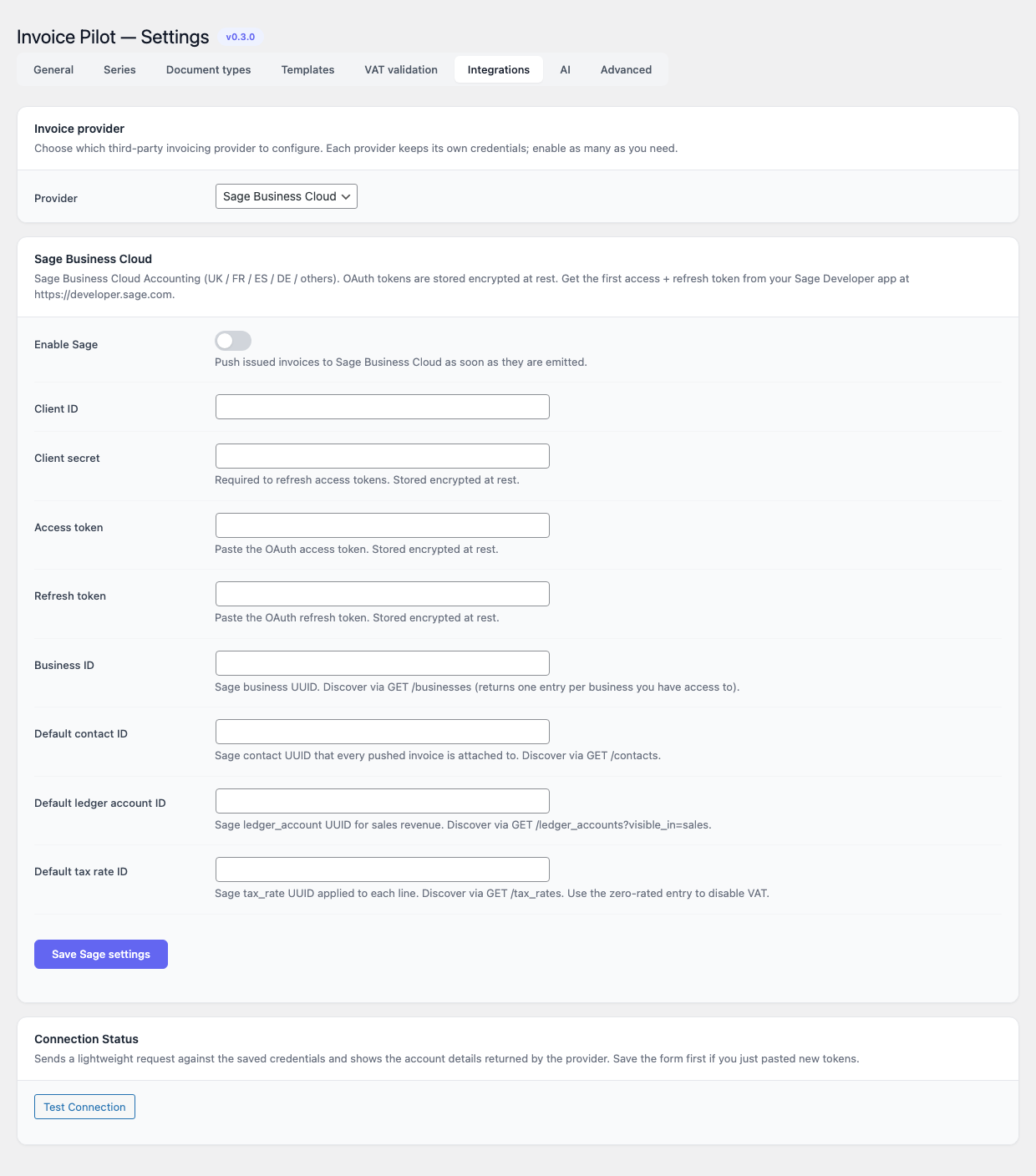
OAuth 2.0 accounting platform (Sage Accounting / Business Cloud).
| Field | Default | Notes |
|---|---|---|
| Enable Sage | off | Push issued documents as soon as they are emitted. |
| Client ID / Client secret | empty | OAuth 2.0 credentials from Sage Developer. |
| Access token / Refresh token | empty | Encrypted at rest. |
| Business ID | empty | Identifier of the Sage business the integration writes to. |
| Default contact id / ledger id / tax rate id | empty | Fallbacks applied when the snapshot does not carry the corresponding mapping. |
AI
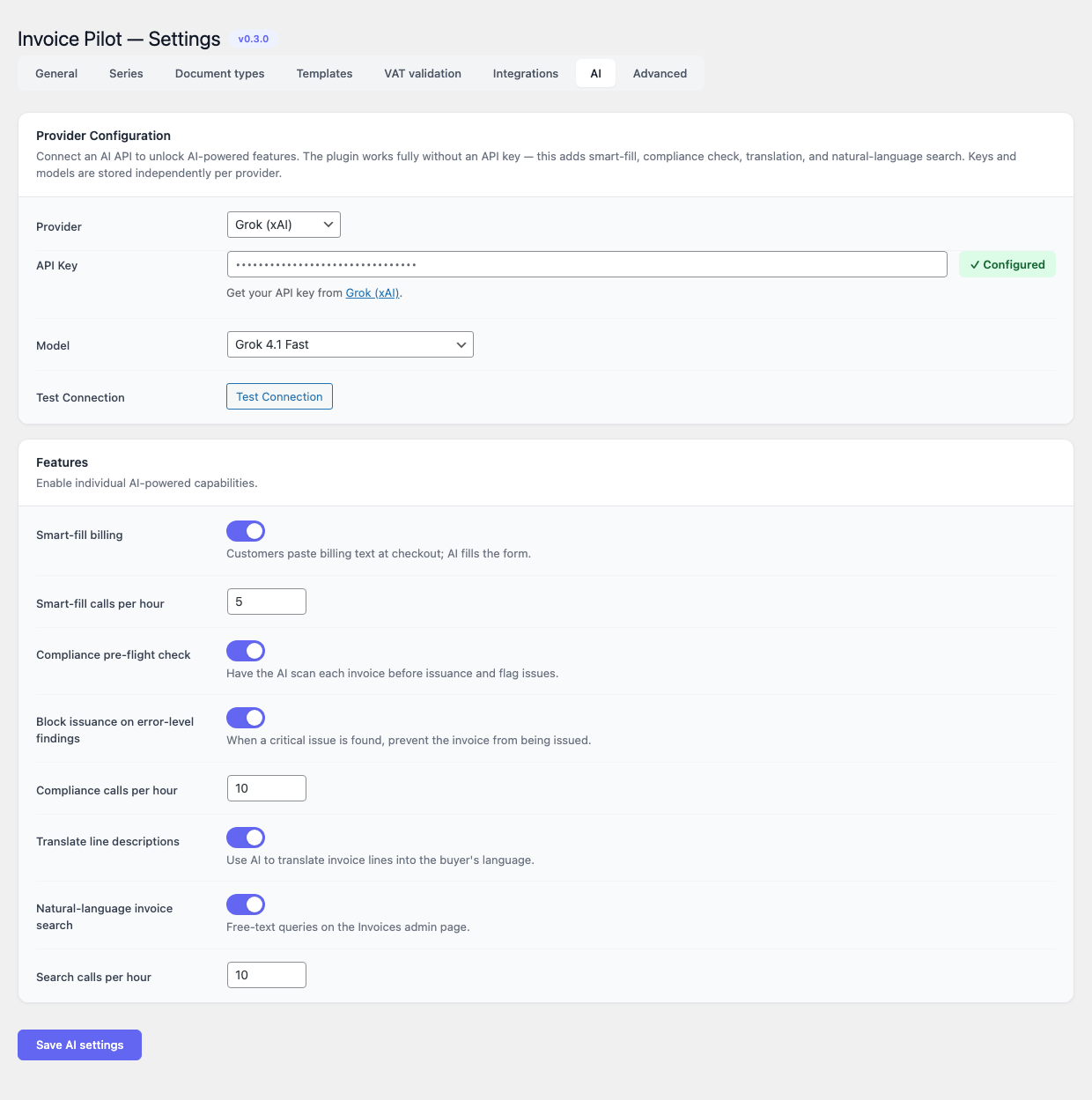
The AI tab is split into two cards: Provider Configuration and Features. The plugin works fully without an API key; this tab adds optional AI-powered capabilities.
Provider Configuration
| Field | Notes |
|---|---|
| Provider | Anthropic (default), OpenAI, Google Gemini, DeepSeek or Grok (xAI). Each provider keeps its own encrypted API key, so you can switch back and forth without re-pasting credentials. |
| API Key | Stored encrypted. The card shows a green Configured badge when a key is already on file. The “Get your API key from …” link points to the chosen provider’s console. |
| Model | Per-provider list (see table below). The first model in the list is used as the default when no model is configured. |
| Test Connection | Calls the provider’s messages / chat/completions endpoint with a one-token prompt and reports success or the upstream error. |
Models offered per provider:
| Provider | Models |
|---|---|
| Anthropic | Claude Opus 4.7 (best quality, default), Claude Sonnet 4.6 (recommended), Claude Haiku 4.5 (fast, cheap) |
| OpenAI | GPT-5 (best quality), GPT-5 mini (fast), GPT-4o, GPT-4o mini (cheapest) |
| Google Gemini | Gemini 2.5 Pro, Gemini 2.5 Flash (best value), Gemini 2.5 Flash Lite (cheapest) |
| DeepSeek | DeepSeek V3.2 Chat, DeepSeek V3.2 Reasoner |
| Grok (xAI) | Grok 4.1 Fast, Grok 4, Grok 3, Grok 3 Mini |
Features
| Toggle | Default | Description |
|---|---|---|
| Smart-fill billing | off | Customers paste a free-form billing block at checkout; the model fills the structured form. |
| Smart-fill calls per hour | 5 | Per-session rate limit. |
| Compliance pre-flight check | off | Have the AI scan each invoice before issuance and flag potential issues. |
| Block issuance on error-level findings | off | When a critical issue is found, prevent the invoice from being issued. |
| Compliance calls per hour | 10 | |
| Translate line descriptions | off | Use AI to translate invoice lines into the buyer’s language. Polyglot-aware when the sibling plugin is installed. |
| Natural-language document search | off | Free-text queries on the Documents admin page. |
| Search calls per hour | 10 |
Advanced
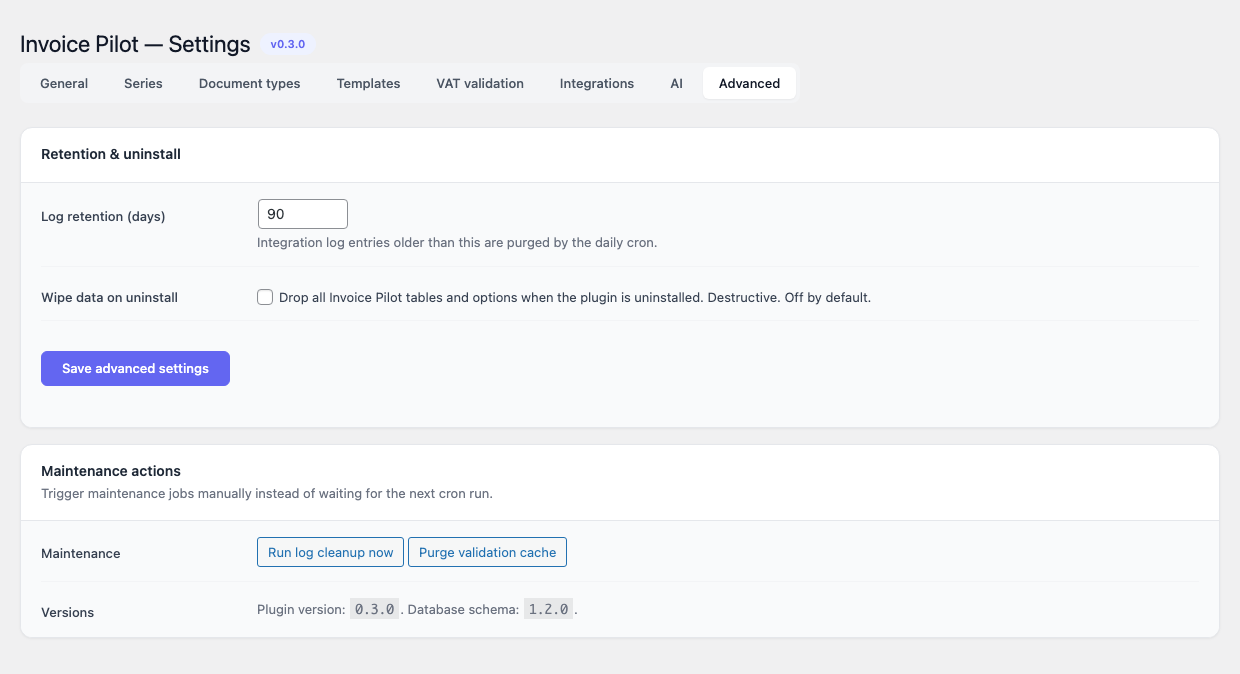
Retention & uninstall
| Field | Default | Range |
|---|---|---|
| Log retention (days) | 90 | 1 – 3650. Integration log entries older than this are purged by the daily cron. |
| Wipe data on uninstall | off | Drop all Invoice Pilot tables and options when the plugin is uninstalled. Destructive. Off by default. |
Maintenance actions
- Run log cleanup now — fires the
invoice_pilot_cleanup_logsaction immediately instead of waiting for the daily cron. - Purge validation cache — deletes every row from the VAT validation cache table.
A small Versions row at the bottom prints the current plugin version and database schema version.
Usage
Auto-issuing an invoice from a WooCommerce order
The default workflow requires no manual action.
- A customer places an order on WooCommerce. The checkout exposes
the VAT number and Tax code fields plus any
country-specific fields registered for the billing country (for
example SDI recipient code and Certified email (PEC) on
ITorders). The VAT field validates live as the customer types — a green ✓ badge appears inside the input when the chain confirms the number, a red ✕ when it fails. When the buyer is in a different EU member state and the VAT validates, WooCommerce zeroes the VAT on the cart automatically (intra-EU B2B reverse charge — see Settings → VAT validation). - When the order reaches the trigger status defined under
Settings → General → Trigger status (
processingby default), Invoice Pilot issues an invoice using the Default series (INVby default), persists an immutable JSON snapshot of the order, renders the PDF, generates the XML envelope for the buyer country, and pushes to any enabled integration. - The order screen gains an Invoice Pilot meta box that lists the issued documents with links to the PDF and XML, plus action buttons for Regenerate, Reissue, Void, Create credit note, Create proforma, Create quote and Push to provider.
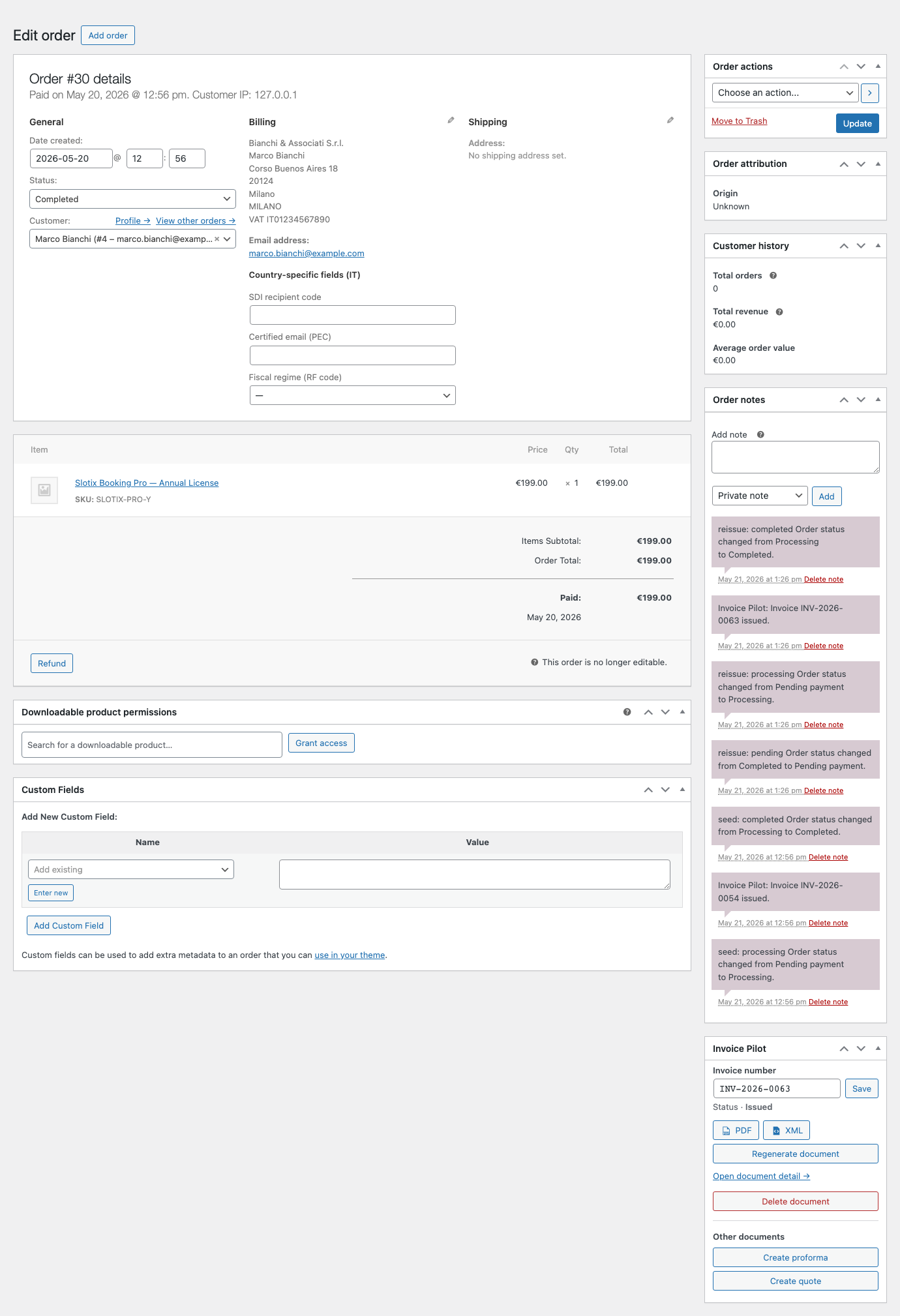
The Invoice Pilot meta box surfaces, for the latest non-void document
on the order: the document number (e.g. INV-2026-0063), the
status pill (Issued / Paid / Void), the PDF and XML
download buttons (token-signed REST links), a Regenerate document
action that re-renders the artefacts against the current template and
seller settings without changing the document number, and an Other
documents section that exposes one-click Create proforma and
Create quote buttons. When an integration is enabled, a Push to
provider button appears alongside the PDF / XML links and replays
the integration call against the configured target.
Issuing manually
If automatic issuance is disabled or the order has not yet reached the trigger status, the order meta box exposes an Issue now button. The same flow applies — snapshot, PDF, XML, integration push — but it runs on demand.
VAT VIES validation on the order
When the buyer’s VAT number is captured at checkout, Invoice Pilot
runs it through the validator chain and persists the outcome on
the order (_invoice-pilot/vat_valid, vat_provider,
vat_company, vat_checked_at). The status surfaces at the top of
the Invoice Pilot meta box on the WooCommerce order edit screen, so
operators can tell at a glance whether the supply is genuinely
intra-EU B2B reverse-charged or only format-validated.
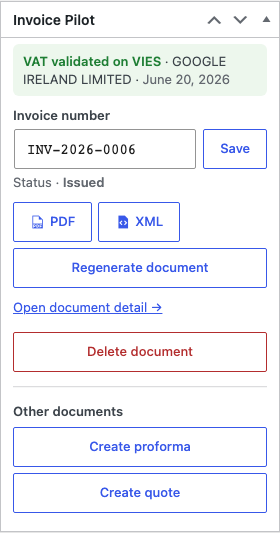
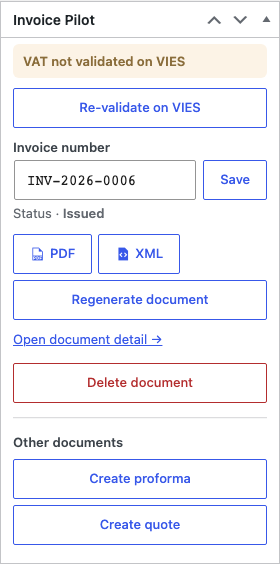
The button is belt-and-braces: most checkouts already validate on submit and persist the answer, so the validated banner is the common case. Operators see the Re-validate flow when:
- An older order was issued before the VIES validator was enabled (the persistence layer landed in invoice-pilot 0.5.0).
- VIES was unreachable at checkout time and only the offline format
validator answered (so
vat_providerisformat, notvies). - An admin edited the buyer’s VAT directly on the order after issuance and wants to confirm the new number.
A small heads-up notice also appears on the order screen when
the buyer is an Italian B2B (has an IT VAT) but the Italian SDI
fields (ei_recipient_code and/or ei_certified_email) are
missing — these are required by FatturaPA, and the warning gives
the operator a chance to fill them in before reissuing.
Credit notes from refunds
When Auto-issue credit note on WC refund is on (the default), any
WooCommerce refund created against an order with an existing invoice
triggers a credit note in the CN series. The credit note links
back to the parent invoice and references it in the XML. The
rendered PDF carries a “Refund of INV-…” disclaimer banner at the
top, a CREDIT NOTE status pill, Refund total in the hero cell,
and hides the IBAN / payment-method footer (the original payment
flow no longer applies). You can also issue a credit note manually
— full or partial — from the Actions card on the invoice’s
edit screen as long as the parent invoice is in issued status.
Proformas and quotes
When the corresponding toggles are on, the order screen also exposes Create proforma and Create quote buttons. Both produce non-fiscal documents — a PDF is rendered but no XML is generated for quotes. The rendered PDF carries a visual treatment specific to its type: a disclaimer banner at the top (“Proforma — not a fiscal document.” / “Quote — not a fiscal document, subject to acceptance.”), a “QUOTE” / “PROFORMA” status pill in place of “ISSUED”, and on quotes the prominent date label switches to Valid until and the hero total to Estimated total. Quotes hide the IBAN / payment-method block since there is no payment due yet.
A proforma can be converted to an invoice with the Convert action, which re-numbers the document under the configured invoice series.
Sending an invoice to the customer
The plugin registers a Send Invoice Pilot invoice to customer
order action under WooCommerce’s standard order-actions dropdown,
which emails the PDF to the buyer using WordPress’s wp_mail().
Downloading documents
PDFs and XML envelopes are served from a publicly addressable but token-signed REST endpoint:
GET /wp-json/invoice-pilot/v1/download/{id}/{format}?token=…{format} is pdf or xml. The token is generated when the
document is issued and printed into the order meta box and the
Invoices list table.
Dashboard
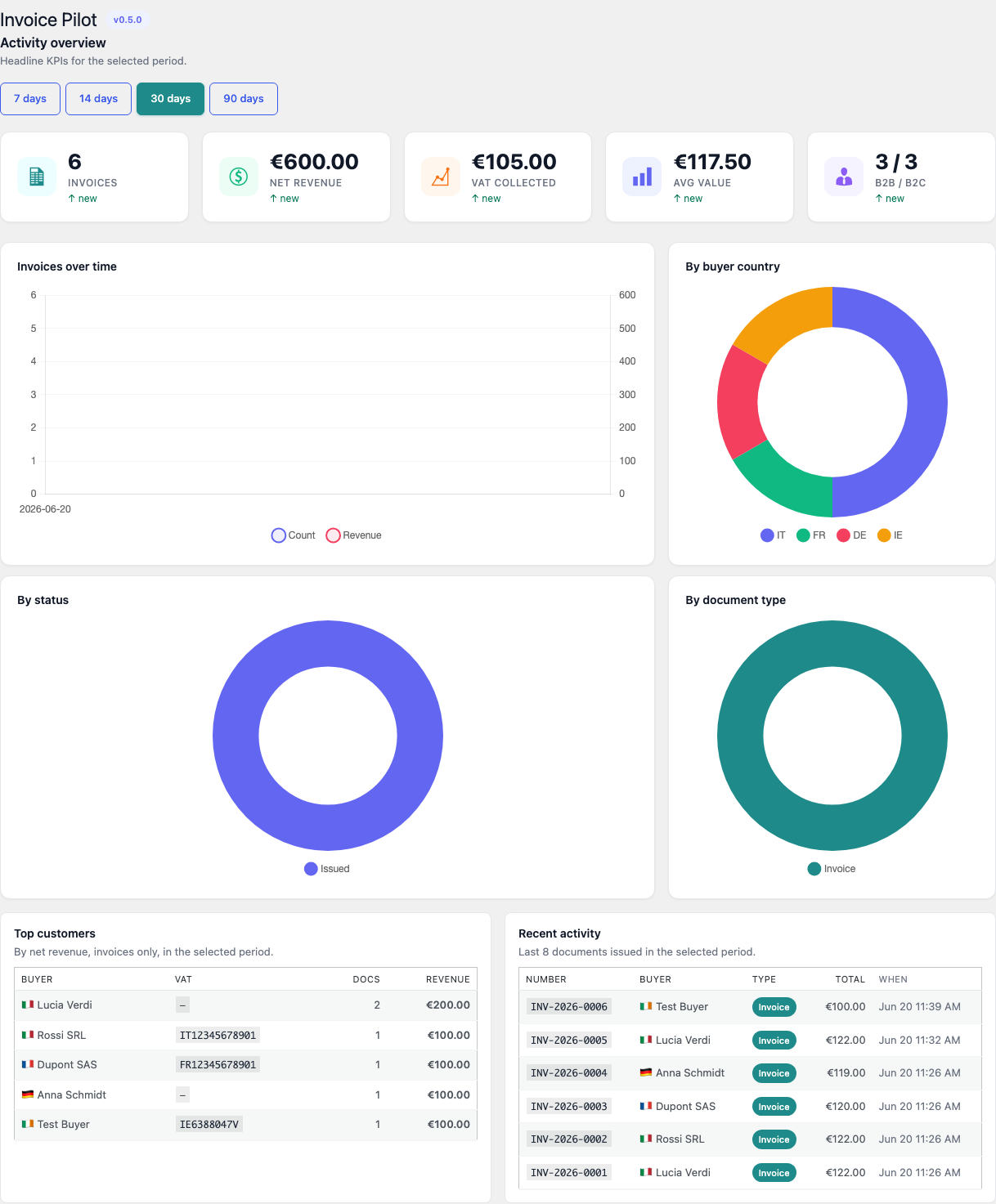
Invoice Pilot → Dashboard opens an Activity overview card on top of a richer set of breakdowns. The Activity overview exposes a period bar with four windows — 7 days, 14 days, 30 days (default) and 90 days — and five KPI tiles:
- Invoices — total document count issued in the period.
- Net revenue — sum of net totals in the shop currency, rendered
with the locale’s currency symbol and two decimal places (e.g.
€3,876.09or3.876,09 €depending on the admin’s locale). - VAT collected — sum of VAT totals from the immutable snapshot. Same locale-aware currency formatting as Net revenue. A separate schema migration backfills this value for invoices issued before schema version 1.3.1, where the column was not populated at write time.
- Avg value — net revenue divided by invoice count, also currency-formatted.
- B2B / B2C — split of B2B (buyer has a VAT number) vs B2C invoices in the same period.
Each tile carries a period-over-period delta badge underneath the
value — ”↑ 12.4% vs prev period” (green) or ”↓ 8.0% vs prev
period” (red). The comparison window is the immediately-preceding
window of equal length (e.g. for 30 days it compares against days
30–60 in the past). When no prior data exists the badge reads
”↑ new”; when both are 0 it reads ”—”.
Below the KPIs, two trend charts sit side-by-side:
- Invoices over time — dual-axis line + area: invoice count on the left axis, net-revenue trend filled on the right axis.
- By buyer country — donut of the top buyer ISO codes with the colour legend below.
Two breakdown donuts follow:
- By status — paid / issued / draft / converted / void counts with a fixed colour per status.
- By document type — invoice / credit_note / proforma / quote / receipt counts (non-void only), each with a per-type colour.
Finally two activity tables:
- Top customers — top 5 buyers in the window ranked by net revenue (invoices only). Buyer name + flag emoji from the country ISO + VAT number + document count + revenue.
- Recent activity — last 8 documents issued in the window: number, buyer, type pill, gross total, datetime.
All figures are hydrated from /wp-json/invoice-pilot/v1/dashboard?days=N
in a single round-trip — the REST handler returns kpi, prev_kpi,
series, countries, statuses, types, top_customers and
recent in one shot.
Documents list
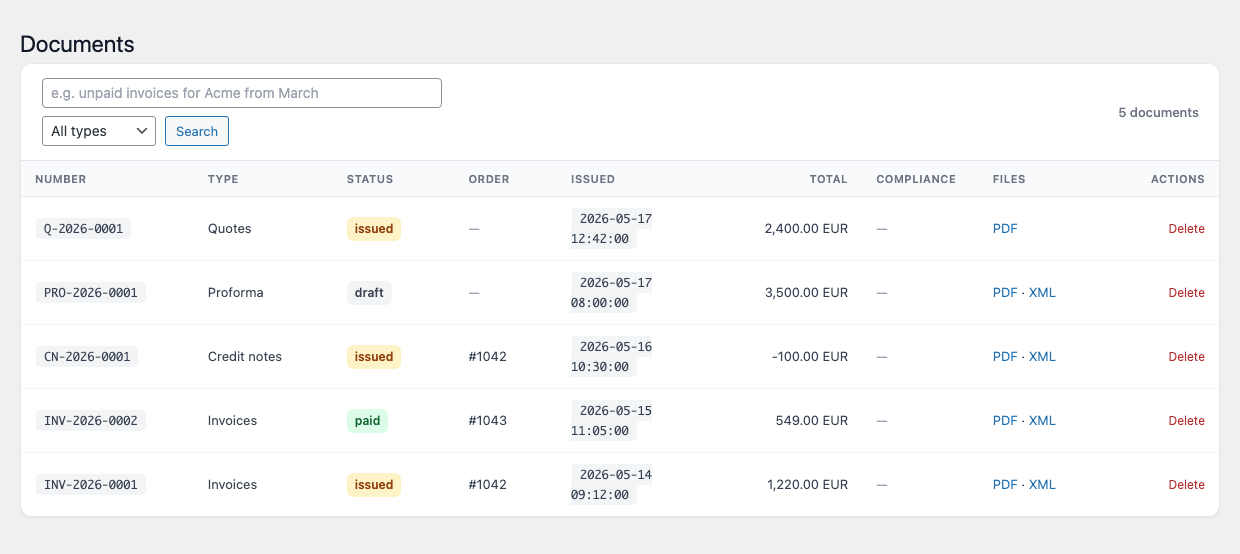
Invoice Pilot → Documents lists every issued document with status
pills (paid / void / converted / draft / issued — colour-coded by
lifecycle state), a Compliance column carrying the colour-coded
badge produced by the AI pre-flight check, and inline PDF / XML /
Delete actions per row.
The page paginates 20 rows at a time and exposes a unified toolbar
that combines the AI free-text search with a document-type filter
(invoice / credit_note / proforma / quote / receipt) plus a
running count on the right. When AI search is enabled, the search
box accepts free-text queries (for example, “German invoices last
month over 1,000 EUR”) that the configured provider translates into
a list query; the resolved filter chips appear above the table so
you can see exactly how the model parsed your phrase.
WooCommerce Orders list
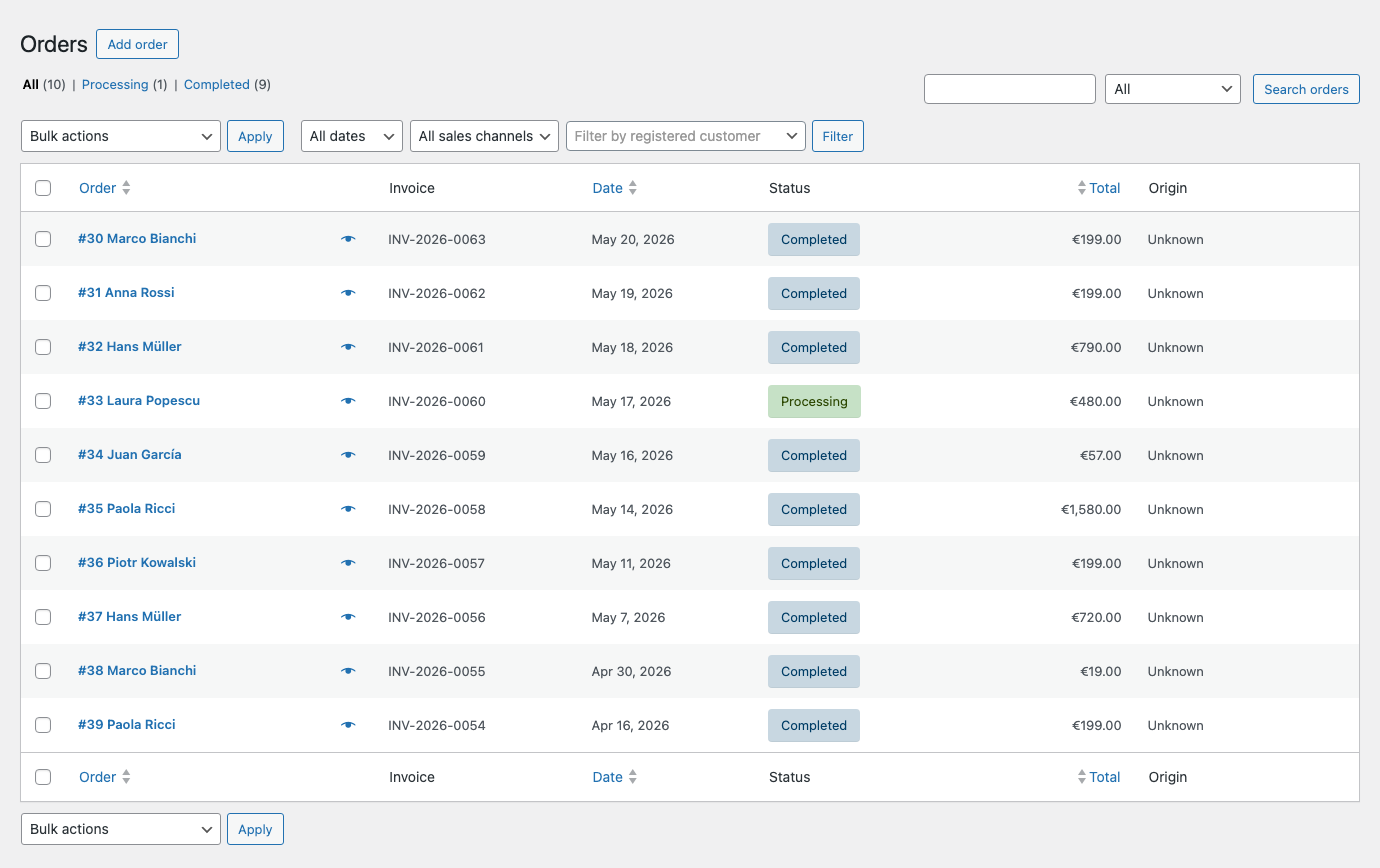
Invoice Pilot adds a single Invoice column to the standard
WooCommerce Orders list (/wp-admin/admin.php?page=wc-orders) so the
shop owner can see at a glance which orders have already been
documented and which haven’t, without leaving the Orders screen. The
column sits between Order and Date and shows the document
number assigned by the configured series (for example
INV-2026-0063) read verbatim from the immutable number column,
with a small eye preview icon next to the number that opens the
rendered PDF inline in a new tab.
Orders without an issued document render an em-dash — useful when
debugging trigger-status mismatches or filtering for orders that
need a manual wp invoice-pilot issue run. The same renderer wires
both the legacy posts-table column (manage_edit-shop_order_columns)
and the HPOS column (manage_woocommerce_page_wc-orders_columns), so
the experience is identical regardless of which orders storage your
shop is on.
Integration log
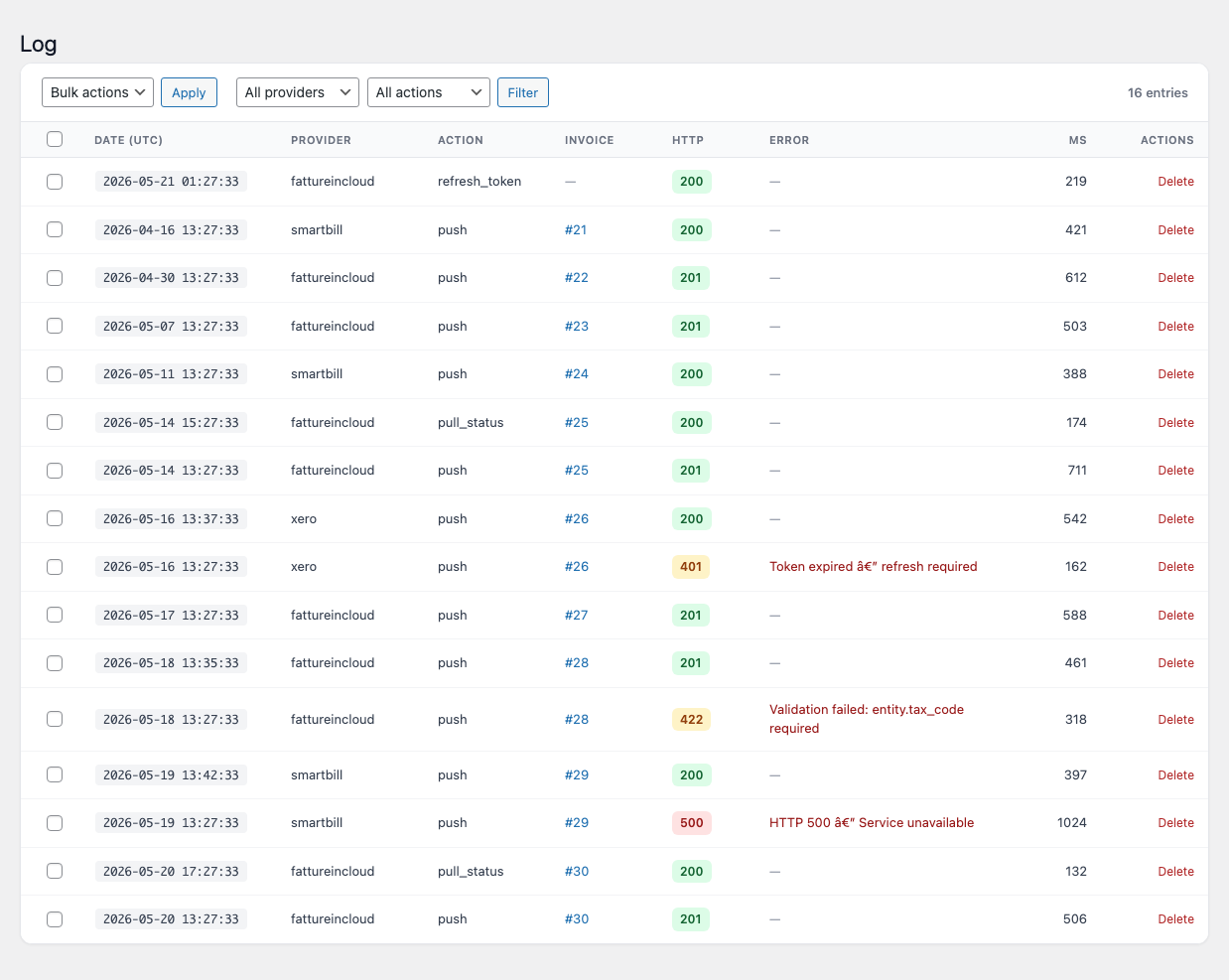
Core\Logger.Invoice Pilot → Log records every integration push, response and failure. The toolbar at the top combines a Bulk actions selector + Apply button (currently a one-action bulk-delete), a provider dropdown and an action dropdown — both populated from the values actually seen in the log so they only ever show filters that match a real row — and a running entries count on the right.
The data grid carries eight columns:
| Column | Notes |
|---|---|
DATE (UTC) | Timestamp pill, UTC. Sorted descending by default. |
PROVIDER | Lower-cased provider slug (fattureincloud, smartbill, xero, …). |
ACTION | Operation that produced the entry (push, pull_status, refresh_token, void). |
INVOICE | #<id> link back to the document, or an em-dash for entries unrelated to a single invoice (token refreshes, manual maintenance). |
HTTP | Coloured pill carrying the upstream status code — green for 2xx, amber for 4xx, red for 5xx (or any entry with a non-null error column). |
ERROR | Upstream error message in red text when the call failed; em-dash on success. |
MS | Wall-clock duration of the call in milliseconds. |
ACTIONS | A red Delete action per row for one-off cleanup. |
Sensitive payload fields are redacted on write by the plugin’s
Core\Logger, so request and response bodies are safe to keep in
the log. Old entries are pruned by the daily
invoice_pilot_cleanup_logs cron according to the Log retention
(days) setting in the Advanced tab.
Network admin (Multisite)
On a Multisite network, an additional Invoice Pilot Network page appears in the network admin sidebar. It aggregates invoice counts and totals across every sub-site that has Invoice Pilot active.
EU-27 invoicing
Invoice Pilot ships a registry of country-specific billing fields for every EU-27 member state. Each field is optional at checkout (the plugin does not force B2B-only data on a B2C order); validation fires only when the buyer country matches the field’s ISO.
The registry currently covers:
| Country | Fields |
|---|---|
IT Italy | ei_recipient_code (7 alphanumeric, default 0000000), ei_certified_email (PEC), fiscal_regime (RF01–RF19) |
FR France | siren (9 digits), siret (14 digits), chorus_pro_service_code |
DE Germany | steuernummer, ust_id, leitweg_id, hrb |
ES Spain | nif, face_oficina_contable, face_organo_gestor, face_unidad_tramitadora |
PT Portugal | nif (9 digits), atcud |
NL Netherlands | kvk_number (8 digits), btw_id |
BE Belgium | bce_number (10 digits) |
LU Luxembourg | — |
AT Austria | uid_nummer, firmenbuchnummer, steuernummer |
IE Ireland | — |
DK Denmark | cvr_number (8 digits), ean_location_number |
SE Sweden | organisationsnummer |
FI Finland | y_tunnus, ovt_code |
PL Poland | nip (10 digits), regon, ksef_id |
CZ Czech Republic | dic, ico (8 digits), data_box_id |
SK Slovakia | dic, ico (8 digits), data_box_id |
HU Hungary | tax_number, group_member_id |
SI Slovenia | vat_id, maticna_stevilka |
HR Croatia | oib (11 digits) |
RO Romania | cui |
BG Bulgaria | eik (9–13 digits), vat_id |
GR Greece | afm (9 digits), dou_code |
CY Cyprus | tic |
MT Malta | id_number |
LT Lithuania | company_code |
LV Latvia | registration_number |
EE Estonia | registry_code |
The block-checkout integration registers fields under the
invoice-pilot/... namespace through the Additional Checkout Fields
API. By default only the Italian fields are exposed in the block
checkout to avoid overwhelming non-Italian shoppers; the All EU-27
fields at checkout toggle in General turns on the full set.
The legacy shortcode checkout always renders the complete registry
filtered by the selected billing country.
Country fields are persisted on the order, copied into the immutable
invoice snapshot, and consumed by the XML writers — for example the
Italian ei_recipient_code becomes CodiceDestinatario /
PECDestinatario in the FatturaPA envelope, while the German
leitweg_id becomes BuyerReference / EndpointID 0204 in
XRechnung.
Integrations
SmartBill
SmartBill (Romania) is wired into the plugin’s IntegrationManager
through the invoice_pilot_integration_providers filter and exposes
the standard provider interface: push, pull_status, void and
test_connection.
- Push maps the invoice snapshot to the SmartBill JSON schema
and calls
POST /SBORO/api/v2/invoicewith the configured CIF and series. - Status sync reconciles draft / issued / paid state when the fifteen-minute retry cron runs.
- Void cancels a previously pushed invoice on SmartBill when the source invoice is voided in WordPress.
All actions are logged to the Integration log. Failures are queued
and retried by the invoice_pilot_retry_integrations cron.
Fatture in Cloud
Fatture in Cloud (Italy) follows the same provider interface and
maps the invoice snapshot to the entity / items_list shape
expected by FIC’s issued-document endpoint. Italian country-specific
fields are mapped explicitly:
ei_recipient_code→ei_codeei_certified_email→certified_email- buyer VAT / tax-code / province / country → corresponding
entitykeys
OAuth credentials are encrypted at rest. The daily
invoice_pilot_refresh_fic_token cron refreshes the access token
when the integration is enabled. Setting Create customers to
on causes the integration to create a new customer record in FIC
on the first invoice for a buyer.
Invoice Pilot does not submit FatturaPA to the SDI on your behalf. SDI submission is left to a separate manual step from inside your Fatture in Cloud account.
The pushed payload uses gross prices (use_gross_prices=true)
so the FIC totals line up to the cent with the WooCommerce order
total — without this, FIC would back-compute the net from the
configured tax type and produce off-by-cent figures on multi-line
orders. Order-level coupons are flattened into a synthetic
discount line item so they survive the push too (FIC has no
order-level discount concept of its own).
AI smart-fill
The AI layer is fully optional. Without a configured API key the plugin still issues invoices, renders PDFs and XML, validates VAT, and pushes to integrations — only the four AI features below are unavailable.
Five providers are supported:
| Provider | Default model | API key URL |
|---|---|---|
| Anthropic | claude-opus-4-7 | console.anthropic.com |
| OpenAI | gpt-5 | platform.openai.com |
| Google Gemini | gemini-2.5-pro | aistudio.google.com |
| DeepSeek | deepseek-chat | platform.deepseek.com |
| Grok (xAI) | grok-4-1-fast-non-reasoning | console.x.ai |
The API key is stored encrypted at rest using the plugin’s symmetric crypto layer. Pressing Test Connection issues a minimal request to the chosen endpoint and surfaces the upstream error if the credentials are wrong.
Four features can be toggled independently once a key is on file:
- Smart-fill at checkout — a “Paste billing details” textarea appears at checkout. The model parses the free-form text and fills the structured WooCommerce billing form, including the country-specific fields. Rate-limited per session.
- Compliance pre-flight check — every invoice is run through the model just before issuance, with the option to block issuance on error-level findings when a critical issue is detected (for example, an Italian B2B invoice missing the SDI recipient code).
- Line auto-translate — invoice line descriptions are translated into the buyer’s language. When the sibling Polyglot plugin is installed, the translation pipeline is delegated to it.
- Natural-language document search — the search box on the Documents admin page accepts free-text queries that the model translates into a list query.
Each feature has its own per-hour rate limit.
Hooks and filters
Centralised hook names live in the \InvoicePilot\Core\Hooks class.
The full list:
| Hook | Type | Purpose |
|---|---|---|
invoice_pilot_redact_keys | filter | Extra keys to redact from logged payloads. |
invoice_pilot_xml_writer_for_country | filter | Override the XML writer per buyer ISO. Two arguments: current writer, ISO. |
invoice_pilot_validator_chain | filter | Override or extend the VAT validator chain. |
invoice_pilot_integration_providers | filter | Register additional integration providers. |
invoice_pilot_country_fields | filter | Add or remove country-specific checkout fields. Two arguments: current fields array, ISO code. |
invoice_pilot_booted | action | Fires after the plugin has booted. Passes the singleton. |
invoice_pilot_register_modules | action | Module registration hook. |
invoice_pilot_invoice_issued | action | Fires after a new invoice is issued. |
invoice_pilot_invoice_rendered | action | Fires after the PDF or XML is rendered. |
invoice_pilot_integration_pushed | action | Fires after a successful integration push. |
invoice_pilot_integration_failed | action | Fires after a failed integration push. |
invoice_pilot_cleanup_logs | action | Daily cron — purges old integration log entries. |
invoice_pilot_retry_integrations | action | Fifteen-minute cron — retries failed pushes. |
invoice_pilot_revalidate_vies | action | Hourly cron — revalidates stale VIES cache entries. |
invoice_pilot_render_integration_tab | action | Fired from the Integrations settings tab so providers can render their own settings cards. |
invoice_pilot_refresh_fic_token | action | Daily cron — refreshes the Fatture in Cloud access token. |
Registering a custom XML writer:
add_filter(
    'invoice_pilot_xml_writer_for_country',
    function ( $writer, $iso ) {
        if ( 'NL' === $iso ) {
            return new My_Custom_Nl_Writer();
        }
        return $writer;
    },
    20,
    2
);
Registering a custom integration provider:
add_filter(
    'invoice_pilot_integration_providers',
    function ( array $providers ) {
        $providers[] = new My_Custom_Provider();
        return $providers;
    }
);
Hiding or extending country-specific checkout fields (for example to drop
Italy’s ei_certified_email (PEC) and fiscal_regime (RF code) prompts
when your shop never needs them — no plugin fork required):
add_filter(
    'invoice_pilot_country_fields',
    function ( array $fields, string $iso ) {
        if ( 'IT' === $iso ) {
            $fields = array_values(
                array_filter(
                    $fields,
                    fn ( $f ) => ! in_array(
                        $f->name,
                        [ 'ei_certified_email', 'fiscal_regime' ],
                        true
                    )
                )
            );
        }
        return $fields;
    },
    10,
    2
);
The filter runs on both the PHP submit-validation path and the JS snapshot served to the WC Blocks checkout, so the two layers stay in sync. Field machine-names currently shipped (use these in the filter):
| Country | Field names |
|---|---|
| IT | ei_certified_email, fiscal_regime |
| FR | siren, siret, chorus_pro_service_code |
| DE | steuernummer, ust_id, leitweg_id, hrb |
| ES | nif, face_oficina_contable, face_organo_gestor, face_unidad_tramitadora |
| PT | nif, atcud |
| NL | kvk_number, btw_id |
The full per-country registry is defined in
CountryFieldRegistry::install_defaults() and covers all EU-27 ISOs.
FAQ
Does Invoice Pilot submit FatturaPA to the SDI?
No. Invoice Pilot generates the FatturaPA XML and stores it on the order; SDI submission is intentionally left to a separate manual step (or to the Fatture in Cloud integration on your account).
Can I add a writer for a country that isn’t built in?
Yes. Hook into invoice_pilot_xml_writer_for_country and return
your own implementation of \InvoicePilot\Modules\Xml\XmlWriterInterface.
Does it work on the WooCommerce block checkout?
Yes. Country-specific fields are registered through the WooCommerce 8.6+ Additional Checkout Fields API, so they appear in both the block checkout and the legacy shortcode checkout. On WooCommerce versions older than 8.6, only the legacy filter path is used.
Does it work on WordPress Multisite?
Yes. Each sub-site has its own tables, settings and numbering
counters. A network admin page under Network Admin → Invoice
Pilot Network aggregates invoice counts across the network. On
new sub-sites, tables and default series are created automatically
through the wp_initialize_site hook.
Are credentials encrypted?
Yes. SmartBill tokens, Fatture in Cloud OAuth tokens and the AI API
key are encrypted at rest via \InvoicePilot\Core\Crypto. Leaving
a token field blank on the next save keeps the existing stored
value.
What happens to my data if I delete the plugin?
Nothing, unless you opt in. The default for Advanced → Wipe data
on uninstall is off, so tables, options, integration logs and
the validation cache are preserved across deactivation /
reactivation. Toggle the option on if you want the
uninstall.php routine to drop everything when WordPress deletes
the plugin.
Where can I get an API key for the AI features?
Each provider has its own console: Anthropic at console.anthropic.com , OpenAI at platform.openai.com , Google AI Studio at aistudio.google.com , DeepSeek at platform.deepseek.com , and Grok at console.x.ai . The AI tab links directly to the chosen provider’s console.
Do I need an AI key for the plugin to work?
No. The AI features (smart-fill, compliance check, line translation, natural-language search) are optional. The core invoicing engine — document lifecycle, PDF and XML generation, VAT validation, integrations, dashboard — runs without an API key.
Troubleshooting
The invoice isn’t issued when the order moves to Processing
Check Settings → General → Trigger status. The default is
processing; if you have customised it (for example to
completed), the auto-issue routine only fires on the configured
status. You can also press Issue now from the order meta box
to issue manually regardless of the trigger.
The checkout shows too many (or too few) country fields
The default exposes only the Italian SDI fields. Open Settings → General → Document defaults → Country-specific billing fields and pick the scope you want:
Off— only universal VAT and tax-code fields are shown.Italy only (SDI / PEC / fiscal regime)— default.All EU-27 country-specific fields— every ISO in the registry.
The setting applies to BOTH the block checkout and the legacy shortcode checkout. Country-specific fields are still hidden client-side when the billing country does not match.
VAT validation hangs or times out
The VIES service is occasionally slow or unavailable. The plugin
keeps a per-VAT cache for the configured TTL (24 hours by default)
and revalidates stale entries hourly through the
invoice_pilot_revalidate_vies cron. If VIES is offline, the
Per-country format validator still accepts well-formed numbers.
You can also raise the cache TTL under Settings → VAT validation.
The dashboard shows no data
The dashboard SQL relies on JSON_EXTRACT / JSON_UNQUOTE against
the immutable invoice snapshot column. Make sure your database
server is MySQL 5.7+ or MariaDB 10.2+. If the period bar shows the
right window but the cards remain on --, open
/wp-json/invoice-pilot/v1/dashboard?days=30 directly and check
the response — REST authentication failures appear as
rest_forbidden.
Integration push fails
Open Invoice Pilot → Log and locate the failed entry — the
HTTP column flags non-2xx responses with a coloured badge and the
Error column shows the upstream error message in red. The failed
entry is automatically retried by the
invoice_pilot_retry_integrations cron every fifteen minutes; you
can also press Push to provider in the order meta box to retry
immediately. Use the Delete action on a row to clear a one-off
entry without waiting for the retention cron.
Test Connection on the AI tab reports an error
The message returned in red comes straight from the provider’s endpoint. Common causes:
- An invalid or revoked API key — generate a new one and paste it into the API Key field, then save.
- A model name that the account does not have access to — pick a different model in the dropdown.
- Network egress blocked by the host — confirm outbound HTTPS to
api.anthropic.com,api.openai.com,generativelanguage.googleapis.com,api.deepseek.comorapi.x.aiis allowed.
Email alerts to the customer are not arriving
Customer invoice emails are sent through WordPress’s wp_mail()
function. If no email arrives, the issue is almost always with the
site’s mail configuration rather than with Invoice Pilot. Install
a transactional mail plugin (for example, one that routes WordPress
mail through SMTP) and trigger the Send Invoice Pilot invoice to
customer order action again from a test order.