Agent Pilot
Agent Pilot turns your WordPress site into a secure remote MCP (Model Context Protocol) server. Install it, connect Claude — from claude.ai on the web, Claude Desktop, or Claude Code — and your site becomes something Claude can actually operate: search posts and products, draft and edit pages on-brand, update WooCommerce orders, moderate comments, flush caches, and more.
The hard part of giving an AI access to your site is doing it safely. Agent Pilot is built around that problem. Every connection goes through a full OAuth 2.1 handshake, every access token is bound to a specific WordPress user, and every tool re-checks that user’s capabilities before it runs. Claude can never do more than the person who authorized it — and everything it does is written to an audit log you can review and revoke at any time.
Highlights
- Standards-based and client-agnostic. A compliant MCP server over the Streamable-HTTP transport with full OAuth 2.1 (authorization code + PKCE + refresh, Dynamic Client Registration). Works with claude.ai custom connectors, Claude Desktop and Claude Code out of the box.
- Multi-user and multi-instance. Connect several Claude instances — even as different WordPress users. Each token is bound to the user who approved it and limited to that user’s role. A shop manager’s connector sees only what a shop manager can do.
- 25 built-in tools across four permission scopes — read, content authoring, WooCommerce and site management — plus an optional Chatbot Pilot knowledge-base scope and any tools other Pilot plugins contribute (invoicing, transactional mail, security, SEO, subscriptions).
- Per-role and per-user tool control. A dedicated Tools screen enables or disables each tool — or a whole scope — for any WordPress role or individual user. Administrators get everything by default; every other role starts empty and is granted exactly what it needs.
- Surgical content edits.
wp_replace_in_postmakes targeted find-and- replace edits, so Claude can fix a typo on a Divi or Elementor page without rewriting thousands of lines of builder markup. - Defense in depth. A consent screen, scope-to-capability double checks, per-call confirmation for destructive actions, a full audit log, rate limiting, an optional IP allowlist, and one-click key rotation.
- Encrypted at rest. The OAuth signing key is generated on activation and stored encrypted with your WordPress salts (or kept in a file outside the database if you prefer).
- No lock-in, no telemetry. Self-hosted. Your data and your AI provider credentials never touch our servers.
How it works
Two open standards do the heavy lifting:
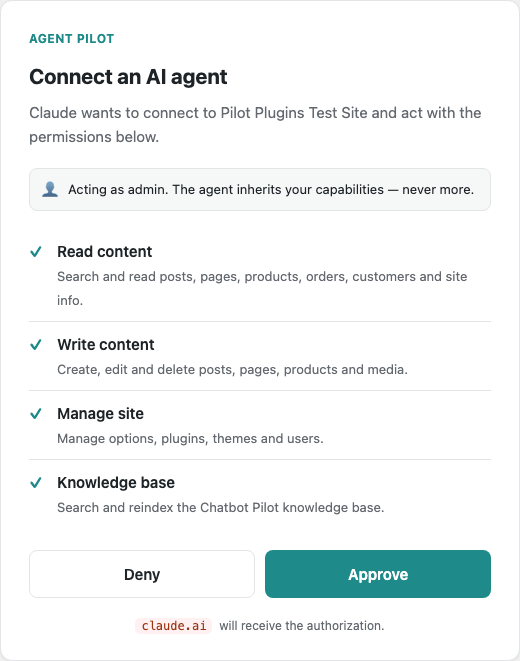
- OAuth 2.1 answers “who is allowed in, and to do what?”. When a Claude client first reaches your site it has no token, so it is sent through a login and consent flow. An administrator approves a set of scopes, and the client receives a signed, time-limited access token.
- MCP (Model Context Protocol) answers “what can the agent actually do?”.
Once authenticated, Claude calls a single endpoint that exposes a list of
tools —
wp_list_posts,wp_save_post,wc_list_orders, and so on. Claude only sees the tools its token is allowed to use.
The discovery, login, consent and token exchange all happen automatically the first time you add the connector. From then on Claude reconnects silently using its refresh token.
Requirements
| Component | Recommended |
|---|---|
| WordPress | 5.8 or newer (tested up to 7.0) |
| PHP | 8.0 or newer |
| WooCommerce | 7.0+ (optional — Woo tools appear only when it is active) |
| Chatbot Pilot | optional — knowledge-base tools appear only when it is active |
| HTTPS | Required for claude.ai web; recommended everywhere |
| WordPress salts | Unique AUTH_KEY / SECURE_AUTH_KEY in wp-config.php (used to encrypt the signing key) |
| Reachability | claude.ai connects from the Anthropic cloud, so the site must be publicly reachable for the web client (local clients can use a local URL) |
Installation
- Open Plugins → Add New → Upload Plugin in the WordPress admin and upload the Agent Pilot ZIP file.
- Activate Agent Pilot. On activation it creates its database tables,
grants the
manage_agent_pilotcapability to administrators, and generates the OAuth signing keys automatically. - Open Agent Pilot → Connectors. Copy the MCP endpoint URL shown at the top — that is the address you give Claude.
- Add the connector in your Claude client (see below) and complete the one-time login + consent.
Connecting Claude
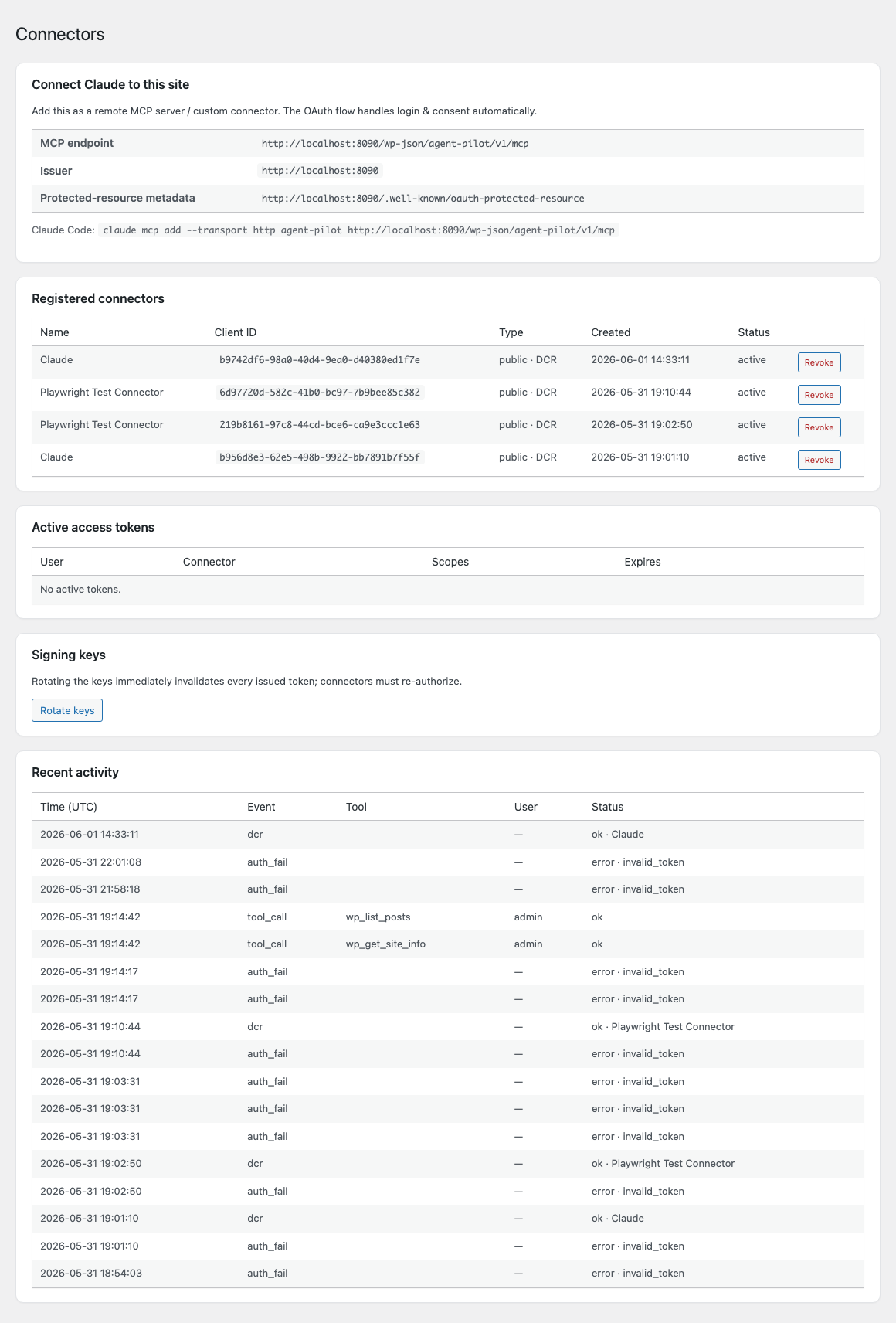
Everything a client needs is on the Connectors screen: the MCP endpoint, the OAuth issuer, and a ready-to-paste command for Claude Code.
claude.ai (web) and Claude Desktop
In Claude, open Settings → Connectors → Add custom connector and paste your
MCP endpoint (for example https://your-site.com/wp-json/agent-pilot/v1/mcp).
Claude opens your site’s login page, you approve the consent screen, and the
connector is ready. The web client connects from Anthropic’s cloud, so your site
must be reachable over public HTTPS.
Claude Code
claude mcp add --transport http agent-pilot https://your-site.com/wp-json/agent-pilot/v1/mcpClaude Code launches the OAuth flow in your browser; after you approve, the
tools are available in your session. Run /mcp to see them, or just ask Claude
to do something — “list the last five draft posts”, “show me this week’s
processing orders”.
Choosing who the agent acts as
The consent screen runs as the logged-in WordPress user, and the resulting
token inherits that user’s capabilities. For a tightly-scoped connection,
create a dedicated WordPress user with a limited role (plus the
manage_agent_pilot capability so they can authorize), and approve the
connector while logged in as that user. The agent will then be able to do
exactly what that user can do — and nothing more.
What Claude can do
Tools are grouped into four scopes. During consent you decide which scopes a connector receives; at call time every tool also verifies the bound user’s WordPress capability. Both checks must pass.
Read (wp.read)
Read-only inspection of the site. Safe to grant broadly.
| Tool | What it does |
|---|---|
wp_get_site_info | Site name, URLs, versions, active theme, WooCommerce status, content counts |
wp_get_site_context | Theme, color palette, typography, block patterns and a recent post — so generated content matches your style |
wp_list_posts | Search and list posts, pages and any custom post type |
wp_get_post | Fetch one post/page with its full content and metadata |
wp_list_terms | List taxonomy terms (categories, tags, product categories…) |
wc_list_products / wc_get_product | Search and read WooCommerce products |
wc_list_orders / wc_get_order | Search and read orders with line items |
wc_list_customers | Search customers with order count and total spend |
Write content (wp.content.write)
Create and edit content. Destructive actions require an explicit confirm flag.
| Tool | What it does |
|---|---|
wp_save_post | Create a new post/page/CPT or fully update an existing one |
wp_replace_in_post | Targeted find & replace inside a page — the safe way to fix a typo or a line on a page-builder page (see below) |
wp_delete_post | Trash or permanently delete a post (confirm required) |
wp_upload_media | Sideload an image/file from a URL into the media library |
wc_save_product | Create or update a WooCommerce product |
wc_save_order | Update an order’s status or add an order note |
wp_comments | List and moderate comments (approve, unapprove, spam, trash) |
Manage the site (wp.manage)
Administrative operations. Each destructive change requires confirmation.
| Tool | What it does |
|---|---|
wp_options | Read or update a WordPress option (updates require confirm; plugin secrets are blocked) |
wp_plugins | List, activate or deactivate plugins (confirm) |
wp_themes | List installed themes or switch the active theme (confirm) |
wp_users | List, read, create, update or delete users — with guards against deleting yourself or the last administrator (confirm) |
wp_maintenance | Flush object cache, flush rewrite rules, clear transients |
Knowledge base (wp.kb)
Available only when Chatbot Pilot is active.
| Tool | What it does |
|---|---|
kb_search | Semantic (embeddings) search over your Chatbot Pilot knowledge base |
kb_stats | Indexing statistics: files scanned/indexed, chunks, last run |
kb_reindex | Trigger a background reindex (requires the manage capability) |
Tools from other plugins
Agent Pilot is extensible: any plugin can register its own MCP scopes and tools, which then flow through discovery, the consent screen and the Tools screen automatically. Each contributed scope maps to a WordPress capability just like the built-ins, so the same scope-and-capability double check applies. Across the Pilot suite this already includes:
| Plugin | Adds the ability to |
|---|---|
| Invoice Pilot | Read invoices and issue one from a WooCommerce order |
| Mail Pilot | Browse the send log and send an email through the site mailer |
| Security Pilot | Read the security status and attack log, block or unblock an IP |
| AI SEO Pilot | Read a post’s SEO fields and set its meta description, focus keyword and schema |
| Subscriptions | View users’ subscriptions, status and billing dates |
The Tools screen — per-role & per-user access
Scopes decide what a connector may do in broad strokes; the Agent Pilot → Tools screen lets you go finer, enabling or disabling individual tools — or a whole scope — for a WordPress role or a specific user.
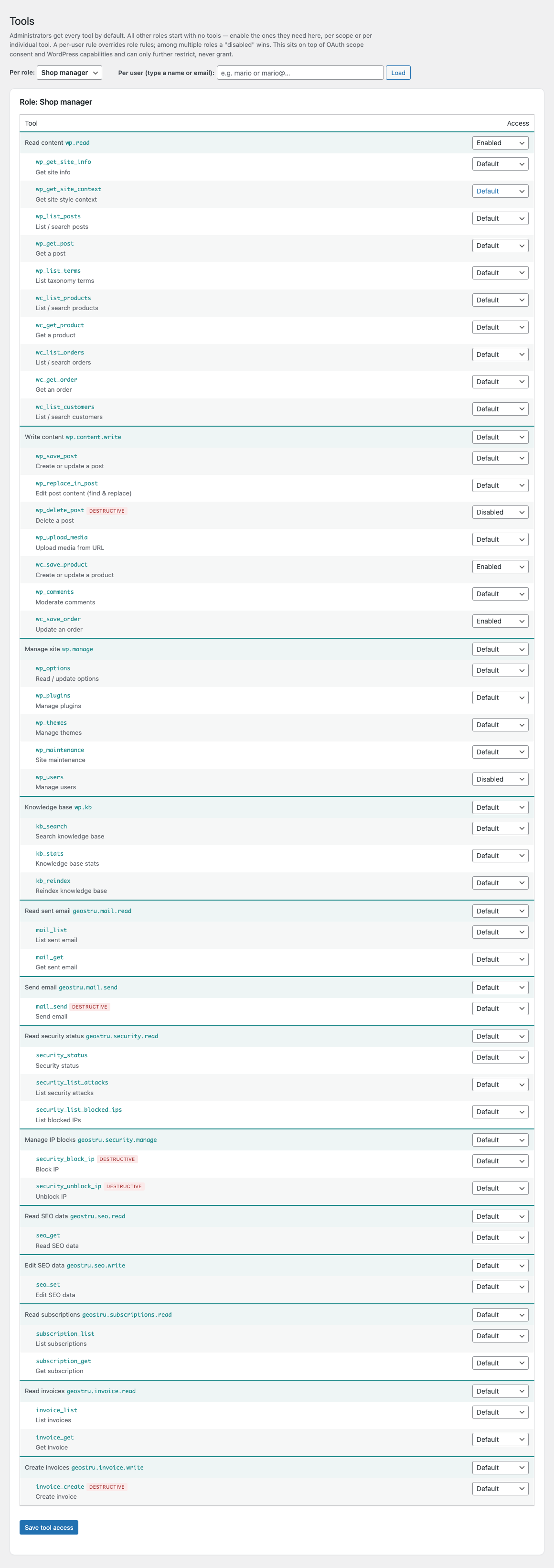
- Admin-safe defaults. Administrators get every tool by default. Every other role starts with no tools — you grant exactly what it needs, per scope or per individual tool.
- Three states per row. Default, Enabled or Disabled. A tool-level rule beats a scope-level rule; across a user’s roles a Disabled always wins.
- Per-user overrides. Type a name or email to load a single user and tune their access independently of their role.
- Restrict-only, and audited. This layer sits on top of OAuth scope consent and WordPress capabilities — it can take tools away, never grant something the bound user couldn’t already do. Every blocked call is written to the audit log.
Editing page-builder pages safely
Pages built with Divi, Elementor, WPBakery and similar builders store their
layout as thousands of lines of shortcode or JSON inside post_content.
Rewriting all of it just to fix a typo is risky — one misplaced character can
break the page.
wp_replace_in_post solves this. Instead of overwriting the whole page, you
give Claude the exact text to find and its replacement, and only those bytes
change — the surrounding builder markup is preserved byte-for-byte. It supports
several edits in one call (a typo and a FAQ line, for instance), refuses to
act when the search text isn’t found, and by default requires the snippet to be
unique so nothing is changed by accident.
Tip: ask Claude to read the page first with
wp_get_postso it copies the exact text, and to runwp_maintenanceafterwards if the builder caches a static version of the page.
Security model
Agent Pilot layers several independent protections:
- OAuth 2.1, not a shared key. Authorization-code grant with PKCE and refresh tokens. Access tokens are short-lived signed JWTs; there is no static password to leak.
- Bound to a user. Every token carries the WordPress user who approved it. Tool calls run as that user, so role and capability rules apply exactly as they would in wp-admin.
- Scope and capability. A scope says “this connector may write content”; the capability check says “this user is actually allowed to.” Both must pass, on every call.
- Per-role / per-user tool gating. On top of scopes, the Tools screen can disable individual tools (or whole scopes) for a role or a single user. It is a restrict-only layer — always enforced, and every blocked call is audited.
- Consent you can read. The approval screen names the connector, shows the requesting host, and lists each requested permission — flagging any your account can’t actually grant.
- Destructive actions are gated. Deleting content, changing plugins/themes/
users or updating options requires an explicit
confirmin the request, unless you deliberately mark a connector as trusted. - Everything is audited. Authorizations, registrations, every tool call and every failed attempt are recorded with the user, connector, timestamp and IP.
- Rate limiting & IP allowlist. Per-connector request limits, plus an optional CIDR allowlist for locked-down deployments.
- Revoke and rotate. Disable a connector or a single token in one click, or rotate the signing keys to invalidate every token at once.
The Connectors screen
Agent Pilot → Connectors is mission control:
- Connect Claude to this site — the MCP endpoint, OAuth issuer and protected-resource metadata URL, plus a copy-paste command for Claude Code.
- Registered connectors — every client that has registered (each Claude instance is its own entry), with its type and a one-click Revoke.
- Active access tokens — one row per live connection, showing the user, the connector, the granted scopes and the expiry, each individually revocable.
- Signing keys — Rotate keys immediately invalidates every issued token; connectors simply re-authorize.
- Recent activity — a live audit trail. A normal new connection shows up as
auth_fail(the initial discovery probe) →dcr(registration) →authorize(approved) →tool_callentries as Claude works. Unauthenticated probes appearing asauth_failare expected for any public endpoint.
Settings reference
Configure behaviour under Agent Pilot → Settings.
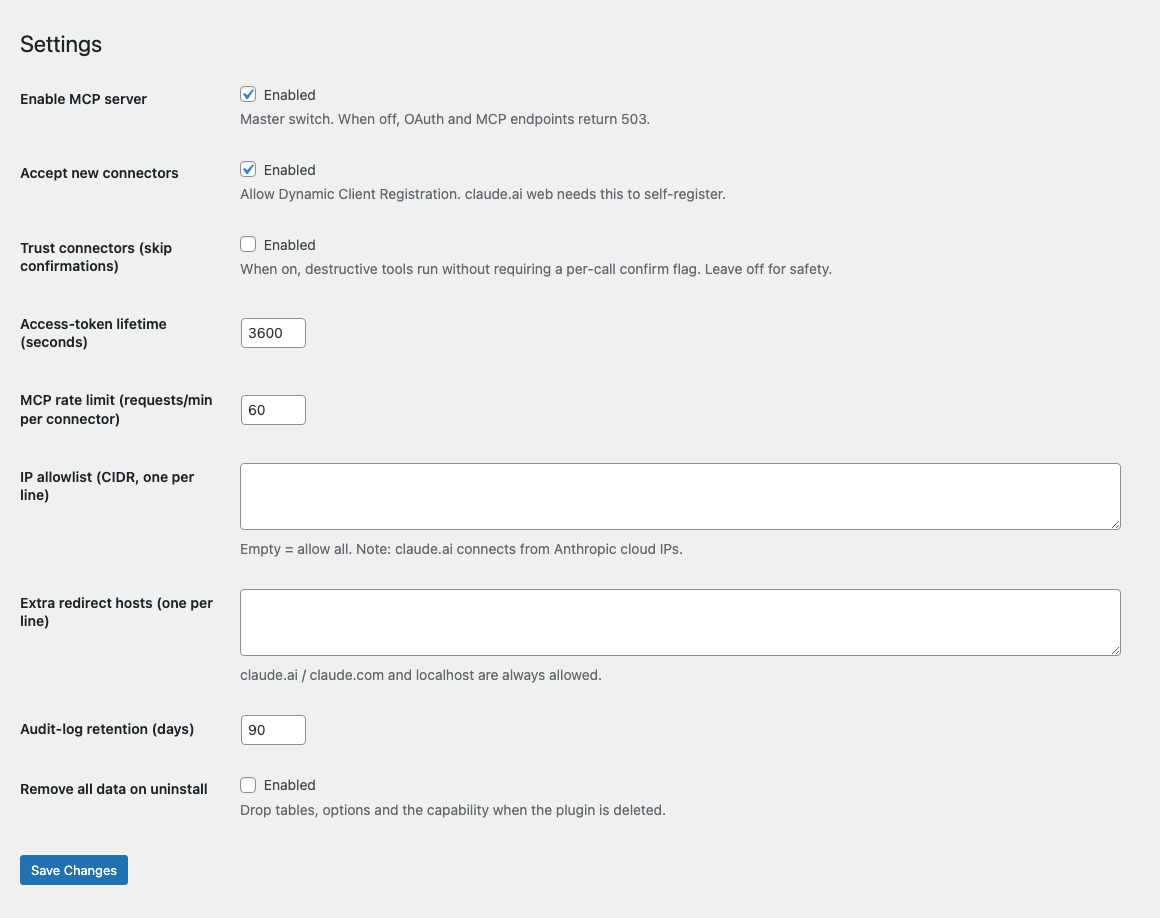
| Setting | Purpose |
|---|---|
| Enable MCP server | Master switch. When off, the OAuth and MCP endpoints return 503. |
| Accept new connectors | Allow Dynamic Client Registration. claude.ai web needs this to self-register; turn it off to freeze the connector list. |
| Trust connectors (skip confirmations) | When on, destructive tools run without the per-call confirm flag. Leave off for safety. |
| Access-token lifetime | How long an access token is valid, in seconds (refresh tokens extend the session). |
| MCP rate limit | Maximum MCP requests per minute, per connector. |
| IP allowlist | Optional CIDR list. Empty = allow all. Note that claude.ai connects from Anthropic cloud IPs. |
| Extra redirect hosts | Additional OAuth redirect hosts to accept at registration. claude.ai / claude.com and localhost are always allowed. |
| Audit-log retention | How many days to keep audit entries before automatic cleanup. |
| Remove all data on uninstall | When enabled, deleting the plugin drops its tables, options and capability. |
Multi-user & multi-instance
Because every token is bound to a WordPress user, you can connect many agents at once with different reach:
- Connect Claude Desktop as an editor for day-to-day content, and Claude Code as an administrator for site maintenance.
- Give a colleague their own connector under their own WordPress account — the audit log attributes every action to the right person.
- Concurrent connections are isolated; one agent’s session and permissions never bleed into another’s.
Troubleshooting
The connector authorizes but Claude never lists tools. This is almost always a URL mismatch. Make sure you used the exact MCP endpoint shown on the Connectors screen, and that your site is reachable over HTTPS from the client.
Every request shows auth_fail even with a token. Some Apache/nginx setups
strip the Authorization header before it reaches PHP. Add a rewrite rule to
pass it through (the same fix used for WordPress application passwords).
claude.ai can’t reach the site. The web client connects from Anthropic’s
cloud — a localhost URL will not work. Use a publicly reachable HTTPS domain.
A tool returns “forbidden”. The bound WordPress user lacks the capability for that action. Authorize as a user with the right role, or grant the capability.
A destructive tool refuses to run. It needs "confirm": true in the request
(or enable Trust connectors). Ask Claude to retry with confirmation.
The site white-screened after activating alongside another plugin. Clear the PHP opcache (or restart PHP) once after activation if a sibling plugin’s shared loader was cached in an inconsistent state.
Uninstall
Deactivating stops the server and scheduled jobs. Deleting the plugin removes
its code; it leaves your data in place unless you enabled Remove all data on
uninstall in Settings, in which case its tables, options and the
manage_agent_pilot capability are dropped.